

A workflow for approving property expenses routes each invoice to the right approver using rules such as amount, vendor, department, and property location. It also records each decision and keeps invoices moving with status updates and reminders, giving property teams a clear view of what is awaiting review and where action is needed.
Approval should reflect the expense and the decision required, rather than sending every invoice along one fixed route. Set thresholds for additional sign-off, assign responsibility by expense type or property, and define how to handle exceptions when an invoice is incomplete or outside policy.
This guide explains how to set routing rules, track invoice status, and use reminders as part of the process. You’ll see how these controls support consistent reviews across a commercial property portfolio, and how property manager software can help organize expense workflows.
Key Takeaways
- Define what employees, supervisors, and accountants each do so invoice reviews have clear ownership.
- Match approval authority to the expense decision, with additional review for higher-risk or higher-value invoices.
- Set up exception paths so incomplete invoices and outdated routing details don’t stall the process.
- Use property-level rules to reflect differences in operating responsibility across your portfolio.
- Track queue age and approval status, then use reminders to keep pending decisions visible.
1. What Is An Expense Approval Workflow?
A workflow for approving property expenses moves a bill from submission to payment preparation through defined checks. It assigns each step to an employee, supervisor, or accountant, and records decisions and supporting documents. For a maintenance invoice, for example, the process might confirm the work relates to a property, obtain managerial approval, and send the bill for accounting review.
The employee or invoice submitter attaches the invoice, identifies the property, and explains the business purpose. The supervisor checks whether the expense fits the approved scope and assigns the correct cost centre. The accountant reviews the coding, supporting records, and accounting treatment before preparing the bill for payment. These controls separate requesting, approving, and preparing payment.
For a VAT invoice in Poland, route the document to accounting to validate its required details under current Polish rules. Checks can cover supplier and buyer identifiers, invoice number and date, service description, taxable base, VAT rate, and VAT amount. If details are missing or the invoice does not match the agreed work, pause posting until the issue is resolved.
Before claiming a tax deduction, accounting should assess the expense’s business purpose, supporting evidence, and applicable VAT treatment. An invoice alone should not trigger a deduction automatically. Record the property, expense category, and reason for the purchase so accounting can review the transaction in context.
Who should approve property expenses in Poland? The employee submits the bill, the supervisor approves the business decision, and the accountant validates the records and accounting treatment. Higher-risk or higher-value decisions can require additional approval steps, as set out in the organisation’s authority structure.
Automation can collect invoices through a submission form and apply coding rules for general ledger accounts and cost centres. For example, a lift-service invoice can be tagged to the relevant property and maintenance account. The accountant checks the suggested coding against the invoice and supporting records, correcting any exceptions before posting.
Reconciliation compares the approved bill with related records, such as a purchase order and delivery receipt. When all three are available, three-way matching can help identify differences in scope, quantities, or invoice details. After validation, accounting can prepare payment and route approved bills to the designated trust or operating account.
How should emergency repairs be approved and documented? Use a defined exception route: record the reason, property, work performed, approver, and supporting invoice or service record. Delegated authority should specify its scope, time period, spending limit, and audit log requirements. Accounting can then review the documentation before reconciliation and posting.
A complete record links the original invoice, approval history, coding, reconciliation result, and payment status. This gives supervisors and accounting a clear basis for reviewing each property expense and tracing its treatment later.
2. Approval hierarchies based on invoice amount, vendor type, and department
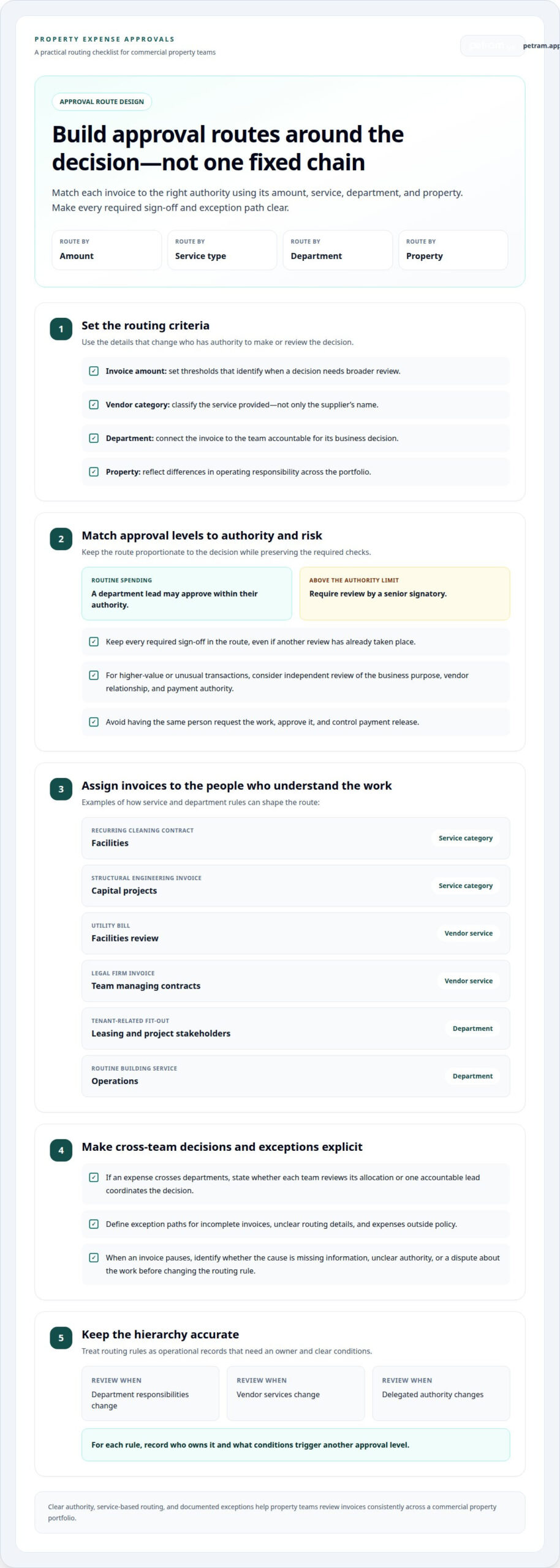
Design approval levels around the decision each invoice requires. Amount, vendor category, and department can each affect who has authority to approve. For example, a recurring cleaning contract may belong with facilities, while a structural engineering invoice goes to the team responsible for capital projects. Make these distinctions explicit instead of sending every bill through the same chain.
Use amount thresholds to identify when a decision needs broader review. A department lead might approve routine spending within their authority, while a commitment above that limit requires a senior signatory. Set limits to match your organisation’s delegated authority, and record which role applies at each level. Keep every required sign-off in the route, even when an invoice has already passed another review.
Vendor categories can determine which specialists review an invoice. A utility bill, for example, may need facilities review, while a legal firm’s invoice may need review by the team managing contracts. Define categories by the service provided, not just the supplier’s name. This helps route a vendor’s different services to people who understand their operational purpose.
Department rules connect an invoice to the team accountable for its business decision. A tenant-related fit-out, for instance, may need review by leasing and project stakeholders, while a building’s routine service belongs with operations. If an expense crosses departments, specify whether each team reviews its allocation or one accountable lead coordinates the decision.
Separate approval duties in proportion to risk. Higher-value or unusual transactions may warrant independent review of the business purpose, vendor relationship, and payment authority. Routine expenses can follow a simpler route. Avoid assigning every decision to the same approver, especially when that person also requested the work or controls payment release.
Find bottlenecks by examining where invoices pause and why. A recurring hold at department review may point to unclear authority, an unsuitable threshold, or missing information in the submission. Classify these causes separately. Changing a routing rule will not resolve a dispute about the work, while clearer authority can keep routine bills from waiting for unnecessary sign-off.
Review the hierarchy whenever departmental responsibilities, vendor services, or delegated authority change. Document the rule, its owner, and the conditions that trigger another approval level. For multi-property operations, property management systems can provide a digital foundation for organizing portfolio workflows.
Preset hierarchy rules can route approvals by amount threshold, department, and vendor category, so invoices follow defined authority instead of one uniform chain.
3. Automated approval routing and status updates
Automation can extract invoice data before a reviewer begins an assessment. Optical character recognition (OCR) reads printed or scanned fields, such as supplier name, invoice date, reference, and totals. The system can enter those values in a draft record, reducing manual data entry. If a scan blurs a digit in the invoice reference, the employee can correct it before the document proceeds.
AI-based classification can suggest a property, expense category, or general ledger code based on invoice text and existing records. Treat these as proposals, not decisions. A service description mentioning a generator, for example, may suggest a facilities category, but the reviewer should confirm the accounting treatment. Clear correction options help teams improve data quality while preserving how the original suggestion was made.
Once required fields are captured, automation can apply the organisation’s existing approval rules. The system evaluates invoice details and assigns the next decision to the relevant role. This reduces manual forwarding while leaving approval authority with people. Rules should specify what happens when a required field is missing, two rules match, or the invoice cannot be linked to a property.
Anomaly checks can compare invoice details with the organisation’s existing records. A duplicate invoice reference, an unexpected change in supplier bank details, or a mismatch between the billed service and purchase documents can trigger a review. A flagged difference is a reason to inspect the transaction, not proof of fraud or error. Keep relevant source documents available to support the assessment.
Plan exception handling before enabling automatic processing. If OCR cannot read a tax identifier, send the invoice for data correction rather than filling in a guess. If a supplier record appears inconsistent, pause payment preparation for the affected invoice until the discrepancy is resolved. Record which field failed, what correction was made, and who made it.
Automation also requires controlled rule maintenance. Changes to property assignments, supplier records, or accounting categories can affect how new invoices are interpreted. Assign ownership of these reference records, and test rule changes on sample documents before applying them. Include a routine invoice, an unreadable scan, and a document with conflicting details in the test.
Use automation to prepare consistent information and identify exceptions, while retaining human review for decisions that require context. This helps property teams reduce repetitive data entry without treating OCR, classification, or anomaly detection as substitutes for approval judgment. The result is a more traceable handoff from captured invoice details to an authorised decision.
4. Location-based and threshold-based approval routing
Property-based rules direct invoices to the people responsible for each building. An office invoice can go to its site manager, while a warehouse bill goes to the lead responsible for that asset. This brings local knowledge into the review, especially for site-specific work. If a supplier serves several buildings, the property field determines which manager receives the invoice.
Threshold rules add approval steps as an expense’s value rises. Set thresholds to match your organisation’s decision structure and approval authority, then map each level to a role. Routine invoices may follow the standard route; bills above a defined limit can require senior approval. Thresholds should not bypass a required signatory or remove finance checks.
Property and amount rules can work together. A repair invoice for an office, for example, might first go to its property manager. If the amount exceeds the applicable threshold, the system adds a senior or finance approver. Rules should also cover missing property data or bills spanning multiple sites. Send those invoices to a review queue rather than assigning them arbitrarily.
Cost centres and project codes add financial context to the approval route. A lift replacement can be tagged to a capital project, while routine cleaning belongs to the property’s operating cost centre. Use the code to identify the budget owner and appropriate approver. For invoices covering multiple properties or projects, require allocation across the relevant codes before final approval.
Routing relies on accurate data. Useful sources include the property register, employee and department records, vendor details, cost-centre assignments, project codes, and approval-authority records. Each answers a different question: which property received the service, which team owns the expense, and who can approve it. If an employee changes roles, update the assignment so new invoices reach the right approver.
Build each rule in a clear sequence: identify the property, read the department or project code, apply the amount threshold, then assign approvers. Record the rule applied, the approver, the decision, and any override in the audit trail. This helps explain why an invoice followed a particular route and supports review if its coding or approval is disputed.
Test rules with representative invoices before applying them across a commercial real estate portfolio. A utility bill, project invoice, and shared-service charge can reveal different routing gaps. Check whether each reaches the correct property owner and budget approver. Review routing errors and exceptions after organisational changes, new projects, or revised approval limits. These checks keep property-based controls aligned with actual responsibilities.
5. Approver reminders and real-time status tracking
A useful reminder tells an approver what to do next, not just that an invoice exists. Include the business purpose, property or project, decision required, and relevant supporting documents. For example, a reminder about a planned roof inspection should say whether the approver needs to confirm the scope, budget ownership, or completion evidence.
Set reminder timing around the invoice’s expected decision date and operational impact. A routine subscription may need a different cadence from a time-sensitive building service. Avoid repeated prompts at fixed intervals if the approver has acted or the invoice is waiting for information. Tie notifications to meaningful workflow events to keep them relevant.
Real-time tracking should show when an invoice entered each stage and when it was last updated. Timestamps help distinguish a newly submitted bill from one that has remained unchanged. If a reviewer updates a record after a site inspection, the new event should appear promptly, so colleagues don’t rely on an outdated view or request information already recorded.
Use status views to understand workload patterns across the portfolio. Group records by property, expense category, or financial period to see where work accumulates. A rise in invoices awaiting completion evidence, for example, may indicate that service documentation reaches finance later than invoices do. That pattern calls for a process review, not simply more notifications.
Make reminders concise and actionable. State the required decision, relevant document, and how the approver can record an outcome. If an invoice needs investigation rather than approval, make that distinction clear. The reviewer can then focus on the specific issue instead of opening records to find out why the prompt arrived.
Agree on notification preferences with each team. Some approvers may benefit from individual prompts for decisions needing immediate attention, while others may prefer a consolidated update for routine items. Preserve the underlying activity history regardless of notification format. This gives finance and property leads a reliable reference when reviewing a delayed decision or reconciling workflow activity.
Review whether reminders lead to action by comparing notification events with subsequent record updates. If prompts are routinely ignored, examine their timing, wording, and relevance before increasing their frequency. A well-designed tracking practice gives property teams a clearer view of operational attention and helps approvers focus on decisions that genuinely need their input. A property workflow system can support this approach across commercial property operations.
Petram.app (Rezone): Property manager software (Rezone)
Petram.app (Rezone) provides Property manager software for commercial real estate operations. Once you have defined approval roles, routing criteria, and status practices, the next step is to fit those processes to the way you manage your properties.
Rezone is a vertical SaaS solution for commercial real estate, designed to support property management operations across a portfolio. It can be a relevant next step if you want a dedicated digital platform for commercial property management instead of handling operational records through disconnected processes. Consider it in the context of your property workflows, with approval responsibilities and accounting controls defined by your organisation.
If you’re exploring property management software for your commercial portfolio, contact Petram.app (Rezone) to discuss your needs.
Build an Approval Model That Can Grow
Your approval structure should keep pace as properties, teams, and reporting needs change. Treat the workflow for approving property expenses as part of your wider operating model, with governance that adapts when responsibilities shift or your portfolio expands. The next step is to decide how property processes should connect across your organisation, not simply add more approval stages.
Petram.app (Rezone) brings commercial property operations and software into the same conversation. Its property management software can help you consider how digital systems fit your operating structure and long-term plans. Start with your portfolio, how your teams work, and the outcomes you want your systems to support.
Take the next step at your pace. Contact Petram.app (Rezone) to discuss your commercial property software needs and explore a suitable direction for your operations.
Frequently Asked Questions
What Is An Expense Approval Workflow?
An expense approval workflow is a controlled path for reviewing a business expense before it enters payment processing. It clarifies who evaluates the business purpose, who confirms budget ownership, and who checks accounting records. For example, a portfolio team can require a project lead to confirm that a proposed refurbishment belongs to an active project before finance processes its invoice.
What is approval routing?
Approval routing assigns a submitted expense to the person or team responsible for the next decision. Rules can use details such as property, department, expense category, or delegated authority. For example, a shared security service covering multiple buildings may need allocation review before it reaches the budget owners. The routing record should show the assignment and any reassignment.
What are the steps in a property expense approval workflow?
A typical process moves from submission to review, approval, accounting validation, and payment preparation. Start by recording the supplier, expense purpose, property, and supporting documents. The responsible manager confirms the business decision, while accounting reviews the coding and documentation. If information is missing, return the submission with a clear reason. Keep the final decision linked to the invoice record.
What approval thresholds are commonly used for property expenses?
Set approval thresholds according to your organisation’s authority structure, budget ownership, and risk controls. There is no useful universal figure for every property portfolio. A routine recurring service may follow the standard approval route, while an unusual project commitment can require additional sign-off. Document each threshold, the role authorised at that level, and the escalation route for exceptions.
How do property managers handle budget checks and expense coding?
Property managers connect each invoice to the correct property budget, cost centre, and expense category before accounting posts it. For example, a repair to a shared lobby should not be coded to a tenant-specific project unless the underlying agreement supports that allocation. Finance can compare the coding with the approved budget and flag unclear allocations for correction before payment preparation.
How can property expense approval workflows prevent fraud and duplicate payments?
Use separate review responsibilities, documented approval history, and duplicate checks across the relevant entity or property records. A duplicate control can compare supplier details, invoice reference, date, and amount, then hold a possible match for review. Finance should also retain evidence of the decision and investigate unusual changes to supplier payment details through the organisation’s established verification process.