

A property management software implementation plan should start with a clear inventory of your data, systems and owners. Identify the authoritative application for each information category, decide what to migrate or archive, and define how connected systems will exchange data. Then assign rollout responsibilities, including who will train each user group.
It’s easy to focus on a platform’s features, but implementation depends on whether your data and daily workflows are ready. Tailor training to each team’s tasks: finance staff need to practise financial processes, property managers need to work with portfolio information, and other users need to rehearse the workflows they handle.
This guide covers the practical decisions behind a controlled rollout, from data inventory and integration mapping to migration, ownership, training and validation. Follow the sequence to reduce uncertainty before go-live and give your team a reliable foundation for using the system.
Key Takeaways
- Assign an authoritative owner to each data domain, and define consistent meanings and quality rules for critical fields.
- Map how existing systems exchange information so integrations support workflows and reduce data silos.
- Use business value, data quality, access needs, and retention requirements to decide what to migrate, archive, or leave behind.
- Set clear milestones and named responsibilities, then train each team according to its role in the new workflows.
- Assess requirements with property management, maintenance, and finance teams, and test shortlisted software in realistic scenarios.
Inventorying property management data sources
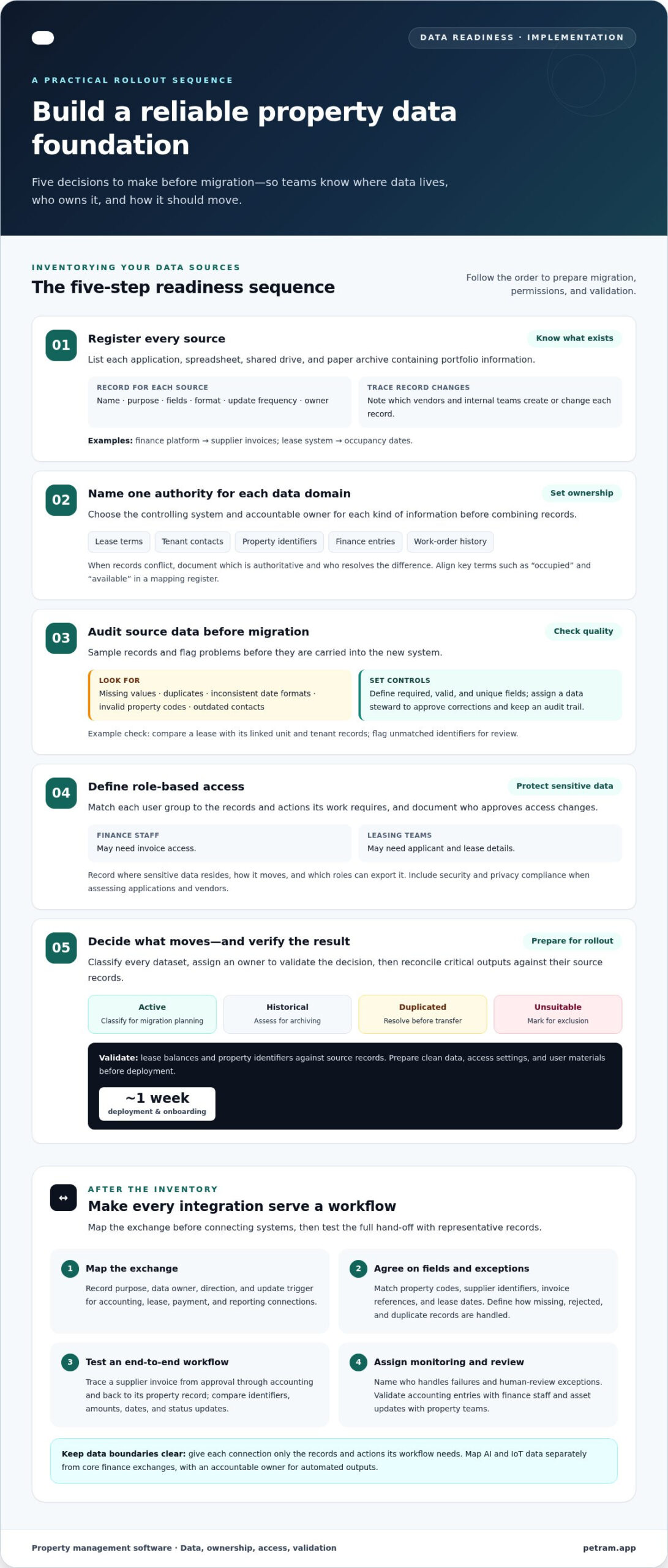
- Create a register of every application, spreadsheet, shared drive and paper archive containing portfolio information. Record each system’s name, purpose, data fields, format, update frequency and owner. For example, identify the finance platform as the source for supplier invoices and the lease system as the source for occupancy dates. Note which vendors and internal teams create or change each record. This inventory provides a sound basis for migration and integration decisions.
- Assign one authoritative owner to each data domain before combining records. Identify the system that controls lease terms, tenant contacts, property identifiers, finance entries and work-order history. If two systems contain different versions of a tenant address, document which record is authoritative and who resolves conflicts. Define key fields consistently, including portfolio-specific terms such as “occupied” or “available.” Keep a mapping register so teams can align data structures across connected systems.
- Audit source data before migration. Sample records to find missing values, duplicates, inconsistent date formats, invalid property codes and outdated contacts. For example, compare a lease with its linked unit and tenant records, then flag unmatched identifiers for review. Set rules for required, valid and unique fields. Assign a data steward to approve corrections, maintain an audit trail and ensure cleanup does not silently alter financial or operational history.
- Classify sensitive information and define role-based permissions before deployment. Match each user group to the records and actions it needs: finance staff may need invoice access, while leasing teams may need applicant and lease details. Limit viewing and editing rights to business needs, and document who approves access changes. Include security and privacy compliance when evaluating applications and vendors. Record where sensitive data resides, how it moves and which roles can export it.
- Use the inventory to prepare migration, archiving, and onboarding tasks. Mark each dataset as active, historical, duplicated, or unsuitable for transfer, then assign an owner to validate the decision. Reconcile critical outputs against their source records after migration, especially lease balances and property identifiers. Schedule team training around actual workflows and role permissions. Property management software deployment and onboarding take about 1 week, so prepare clean data, access settings, and user materials before that stage begins.
Integration with existing systems
Map each connection to a specific workflow before configuring integrations. This makes system links purposeful data exchanges, rather than additional silos.
-
Plan Software Integrations
List the existing systems that exchange information with property management software. Include accounting platforms, lease databases, payment tools and reporting applications used in current workflows. For each connection, record its purpose, data owner, exchange direction and update trigger. For example, specify whether an approved supplier invoice moves from property management into accounting or whether payment status returns to the property record.
Define the expected result of every exchange before implementation. Identify fields that must match, such as property codes, supplier identifiers, invoice references and lease dates. Agree how to handle missing values, rejected records and duplicate submissions. Avoid building an integration around an undocumented spreadsheet workaround. First establish which system owns the information and which team resolves exceptions.
-
Connect Existing Systems
Connect systems around complete operational workflows, then test each exchange with representative records. For example, trace a supplier invoice from approval through accounting entry and back to its property record. Confirm that identifiers, amounts, dates and status updates remain consistent at each hand-off. An integration should reduce manual re-entry and data silos, not create another place where staff must correct the same record.
Document who monitors failures and how teams restore interrupted exchanges. Use a test environment or controlled sample before live records flow between platforms. Compare the information at both ends and investigate mismatches by field and source. Define an exception process for records that need human review, such as an invoice linked to an inactive property code.
- Map AI and IoT data separately from core finance exchanges. For an AI-driven workflow, define which records inform the output, who can access them and how staff review the result before acting. For an IoT connection, document the source device, the property or asset it relates to and the operational team responsible for interpreting its data. Automated output still needs an accountable owner.
- Set integration permissions and data boundaries before enabling access. Give each connection only the records and actions its workflow requires. For example, a reporting feed may need read access to selected property fields, while an accounting exchange may require approved financial transactions. Document access ownership and review how sensitive information moves between systems. This keeps integrations aligned with the platform’s role-based controls.
- Validate integrations with business users before rollout. Ask finance staff to compare accounting entries with source invoices, and property teams to trace updates to the correct asset record. Track failed transfers, unmatched identifiers and manual corrections in an issue log. Assign each issue to a system owner, resolve the cause and repeat the test. Use the workflow map to maintain connections as processes or systems change.
Deciding what to migrate, archive, or leave behind
- Classify each dataset by operational purpose before moving it. Mark records as active, historical, duplicated or obsolete, then assign a business owner to each classification. An active lease linked to an occupied unit may support current workflows, while a duplicate supplier entry may need consolidation. Apply the same categories across the portfolio so teams make consistent decisions.
Record each decision, its rationale and the person who approved it. This creates a traceable basis for migration and prevents teams from treating every legacy file as equally valuable.
- Prioritise records that support current operations in the new platform. Select the information teams need to manage properties, leases, tenants, suppliers and finance. For example, migrate active lease terms and property identifiers when they underpin current reporting. Confirm that each selected field maps to a destination field without changing its meaning.
Separate essential records from convenient reference material. Migrate a file when staff need it for a defined workflow, not simply because it exists.
- Set an archive path for historical records that remain useful but do not belong in daily workflows. Group closed leases, previous invoices and superseded documents by property, record type and date. Preserve links that help staff interpret a document, such as its property code or supplier reference.
Define who can retrieve archived information and how requests are handled. Keep archive access separate from routine editing permissions, and record which system or repository holds each collection.
- Exclude records that are redundant, unusable or unrelated to portfolio operations. Examples include duplicate spreadsheets, test entries, abandoned exports and blank templates with no current owner. Before excluding a dataset, check whether it contains unique information that an active process still relies on.
Document exclusions in a decision log, including the dataset name, owner, reason and approval. This prevents a discarded spreadsheet from reappearing later as an unofficial source of truth.
- Test the proposed selection with a controlled migration sample before transferring the full dataset. Gov.pl notes that piloting a project idea or part of it can help identify weaknesses before full implementation. Choose representative records, including a current lease, a closed lease and a finance entry, then inspect field mappings and document relationships.
Ask relevant users to confirm that each sample supports its intended workflow. Revise the selection if you find missing history, broken links or duplicate records.
- After migration, reconcile critical outputs against source records. Compare property identifiers, active lease details and finance totals, then log each mismatch with its owner and resolution. Keep the source dataset available during validation so staff can investigate differences rather than rely on memory.
Close the migration decision only after owners approve the result. Store the final record of migrated, archived and excluded data with the project documentation, so future portfolio changes follow the same logic.
Implementation stages and project ownership
Structure delivery around clear stages, accountable owners and approval points. Use a property management software implementation plan to connect milestones with operational decisions.
-
Estimate the Implementation Timeline
Build a schedule covering discovery, configuration, migration, training, deployment, and validation. Discovery and planning is estimated to take 1 to 2 weeks; deployment and onboarding take about 1 week. Final validation takes 2-4 weeks, in addition to ongoing QA and testing. A basic MVP is estimated at 3-4 months, while a full platform with AI and IoT is estimated at 8-12 months.
A project with web, mobile, and basic AI is estimated at 6-8 months. Treat project estimates as whole-project timelines, not stage durations. Identify dependencies, such as migration testing before user acceptance, and make owners responsible for reporting slippage early.
- Assign an accountable owner to every milestone before work starts. Name a business sponsor to approve scope, a project lead to coordinate delivery and operational leads to validate workflows. Give finance ownership of financial-process acceptance, while property teams review portfolio operations. Document responsibilities, decision deadlines, dependencies and escalation routes in the schedule.
Plan training as a formal workstream. Schedule role-specific sessions around real tasks, such as reviewing leases or processing invoices. Ask each team lead to confirm readiness before the relevant workflow goes live. The implementation plan should identify who prepares training materials and handles unanswered process questions.
-
Identify and Mitigate Implementation Risks
Maintain a risk register that names each issue, its impact, owner and mitigation. Common risks include unclear decision rights, incomplete requirements, integration failures, migration errors and low user readiness. For example, assign an integration owner to investigate failed transfers and a business owner to approve corrected records.
Pilot a workflow before full rollout. Gov.pl notes that piloting a project idea or part of it can help identify weaknesses. Record findings in the property management software implementation plan, then assign actions before expanding deployment.
- Set approval gates for each stage. Require signed-off requirements before configuration, tested mappings before migration and user acceptance before go-live. Keep a decision log linking scope changes to their owners and dependencies. If a finance workflow fails acceptance testing, assign someone to resolve the issue and repeat the test before release.
During go-live, hold a daily issue review with the project lead and operational owners. Track defects, user questions, and unresolved decisions in one log. After launch, measure adoption, accuracy, and speed during the first 90 days after go-live. Assign follow-up actions to named owners, then update the implementation plan as operating needs evolve.
How do you assess requirements and choose property management software?
- Gather requirements from the people who will use the system, not only senior decision-makers. Include property managers, maintenance teams and finance staff in the assessment. Ask each group to describe recurring tasks, hand-offs, reporting needs and current obstacles. For example, finance can explain invoice approvals, while property managers identify the information needed for lease reviews.
Record each requirement as a task with an intended outcome. “Improve reporting” is too broad. “Produce a property-level occupancy report from current lease records” gives teams something they can test.
- Separate essential requirements from preferences before comparing software. Classify each item by operational importance, user group and whether it depends on integration or data migration. Tracking lease milestones might be essential, while a different dashboard layout could be a preference. This distinction stops attractive extras from outweighing core operational fit.
Document acceptance criteria alongside every essential requirement. For a finance workflow, specify which transaction details users must review and what successful completion looks like.
- Test shortlisted software with your teams using realistic portfolio scenarios. Ask users to locate a lease, review a property record or follow an invoice through approval. Observe where they pause, repeat data entry or need workarounds. Record results against the same requirements matrix so each solution is assessed on comparable tasks.
Include users with different responsibilities in the evaluation. A system that works for property managers should also support the finance and maintenance workflows identified during discovery.
- Assess whether each option can accommodate future portfolio growth. Consider how new properties, users, workflows and reporting needs would fit the operating model. Ask teams to evaluate a realistic expansion scenario, such as adding a property with distinct lease and maintenance processes. Identify whether growth would require workarounds or changes to existing procedures.
Compare that scenario with current needs rather than selecting software solely for hypothetical future features. Prioritise adaptability that supports the portfolio’s direction and preserves usable workflows.
- Make the selection based on documented evidence, not presentation impressions. Compare requirement coverage, real-world test findings, integration needs, user access and the effort required to adopt each workflow. Record unresolved gaps and their operational impact. Assign a decision owner to explain how the selected option meets essential criteria and supports the teams responsible for daily operations.
Use your completed assessment to explore commercial property management software aligned with your portfolio workflows.
Petram.app (Rezone): Property Manager Software (Rezone)
Petram.app (Rezone) offers Property Manager Software (Rezone), a vertical SaaS platform for commercial real estate. Its specialized digital tools and AI Agents help owners and managers streamline operations and increase property value.
Consider Rezone when your data inventory, workflows and rollout responsibilities are clear and you’re assessing software for a commercial property portfolio. Use your requirements to evaluate how property management software can support your operating model. A structured implementation plan gives your team a practical route from assessment to adoption.
Visit petram.app to explore Rezone.
Put your implementation decisions to work
Use rollout decisions as an operating framework for future portfolio changes. Keep the implementation plan active after launch: record ownership changes, new workflows and adjustments to system connections as your organisation evolves. It gives teams a shared reference for how data is managed, who approves changes and how new requirements fit the existing structure.
A strong property management software implementation plan also provides a disciplined starting point for future decisions. When priorities shift, return to the agreed business requirements and assess proposed changes against them. This keeps technology decisions connected to operations rather than driven by isolated requests or short-term workarounds.
If you’re ready to explore the next step for your commercial property management operations, contact Petram.app (Rezone). Move forward with clarity, and give your team a practical foundation for continued progress.
Frequently Asked Questions
How should you train each role?
Train each role on its users’ tasks, using realistic property records. Finance staff can practise reviewing an invoice and tracing its status, while property managers work through lease updates and portfolio reports. Give team leads time to demonstrate common workflows and answer role-specific questions. After training, ask users to complete a task independently to identify confusing steps before they affect daily operations.
Should you run a parallel run or cut over?
Choose a parallel run when your team needs to compare outputs before relying on the new system. For example, process a selected reporting cycle in both platforms and compare property-level results. A cutover may suit a simpler workflow with clear acceptance tests and a defined switch point. Decide by assessing the risk of inconsistent records, the workload of duplicate entry and how quickly errors can be detected and corrected.
What goes on the go-live week checklist?
Include named contacts, approved user access, tested workflows, migration reconciliation and a clear route for reporting issues. Confirm that each team can complete its critical task, such as finding a lease or recording an invoice. Keep a decision-maker available to answer questions about process changes, and log each issue with its owner and status. Review unresolved problems daily and communicate any required action to affected users.
What should you do before you migrate anything?
Before migration, agree what success looks like for each record type and prepare a representative test sample. Confirm that source files are readable, field formats are understood and linked records retain their relationships. For example, a lease sample should remain connected to the correct property and tenant after transfer. Record original values for critical fields so the team can compare migrated results and investigate discrepancies promptly.
What should you measure in the first 90 days?
Measure adoption, data accuracy, and workflow speed during the first 90 days after go-live. Break adoption down by user role and task, rather than relying only on overall logins. Check sampled records for errors, then track how often users need corrections or manual workarounds. Compare completion times for defined workflows against a pre-launch baseline. Pair these indicators with team feedback to distinguish training needs from configuration or process issues.
Which integrations should you plan for?
Prioritise integrations that support essential, recurring workflows. For a commercial property portfolio, assess connections with accounting, lease administration, payment processing and reporting systems. Map each exchange to a business outcome, such as linking an approved invoice to the correct property record. Decide which system owns each field, how exceptions are handled and who investigates failed transfers. Test the full workflow, not just whether two applications connect.
What are the steps to implement property management software?
Start by defining requirements and assigning a project owner. Then map data sources and workflows, select the software and specify integrations. Prepare and test data before migration, then configure access and train users by role. Pilot a representative workflow, resolve issues and approve the release against agreed criteria. After go-live, monitor user adoption and operational results, then assign owners to follow-up improvements.
What data should be migrated and how do you plan data migration?
Migrate records needed for active operations, such as current leases, property details, tenant contacts and related finance information. Keep useful historical material accessible in an archive when daily workflows do not require it. Plan migration by mapping each source field to a destination field and testing representative records first. Include documents and record relationships in the test, then reconcile important outputs before the new platform becomes the working source.