

Portfolio reporting is clearer when property, lease, financial, and operational information is available through a consistent system. Centralizing portfolio data in one platform helps teams bring records together, apply shared definitions, and compare properties without relying on scattered files. The goal is not simply to collect more data, but to make it consistent and useful.
When information is spread across disconnected tools, teams spend more time reconciling reports, tracing changes, and establishing a reliable view of portfolio performance. This can make it harder for managers to identify operational issues and for decision-makers to understand what is driving results.
This article explains how centralized portfolio data supports reporting, visibility, data integrity, and performance tracking, and what to consider when choosing portfolio management software and data tools. It also covers how an integrated approach can reduce manual work while preserving the context behind each property’s results, helping teams make decisions with greater clarity and control.
Key Takeaways
- Bring portfolio information into a shared reporting view so managers and executives can examine operational results and portfolio-wide trends.
- Standardize key data and reporting definitions to make comparisons more meaningful and reduce reconciliation work.
- Integrate relevant systems and validate data during migration to strengthen accuracy and preserve visibility into where information comes from.
- Use consistent performance metrics to identify emerging issues, investigate differences between properties, and track follow-up.
- Explore commercial real estate property management software such as Rezone when disconnected tools make portfolio operations harder to oversee.
How does centralized reporting handle data from multiple portfolios?
Centralizing portfolio data in one platform means bringing information from separate properties or portfolios into a shared reporting environment. The system gathers relevant records, applies consistent definitions, and presents consolidated results while retaining each portfolio’s context. Managers can, for example, review one property’s operating results while executives compare trends across the wider portfolio.
Centralized financial reporting combines data into dashboards and analytics that support both operational review and higher-level decisions. Finance teams can examine trends, investigate results, and prepare management or statutory reports using dynamic analytics. Recurring reports can be automated and delivered securely, reducing repeated manual compilation. A useful dashboard distinguishes property-level performance from portfolio-wide patterns, so a change at one asset doesn’t obscure the overall picture.
Portfolio management platforms differ in the capabilities they provide, including data integrations, dashboard flexibility, reporting workflows, access controls, and audit trails. Compare those features against your reporting needs, such as consolidated cash-flow views or performance comparisons across entities. Pricing depends on the case and is provided after a quote request; portfolio scale, integration scope, user access, and required reporting functions affect the cost.
For Polish organizations, GDPR and applicable Polish data-protection rules should guide how platforms handle personal data. Map the purpose of each data flow, who can access it, how long it is retained, and which parties process it. Include security controls in the review, such as single sign-on, multifactor authentication, encryption, and backups. These controls support a structured assessment but do not replace the organization’s responsibility for data protection and compliance.
Data feeds determine how current a dashboard can be. Native connectors, APIs, file imports, and custom connections can bring relevant records into a shared view, but refresh frequency depends on the integration. A daily property update, for example, may support operational monitoring, while finance teams may use scheduled reporting periods for reconciled statements. Make the feed’s timing and source visible so users can interpret figures confidently.
Self-service dashboards give portfolio teams access to relevant information without waiting for each report to be assembled centrally. Set role-based views so property managers can review operating indicators while executives see portfolio-level trends. Consistent definitions make comparisons meaningful: if properties report occupancy or operating costs differently, the dashboard should flag the difference rather than suggest a misleading comparison. Exception trends can help teams prioritize recurring issues and investigate root causes.
Financial and operational costs of poor data access and quality
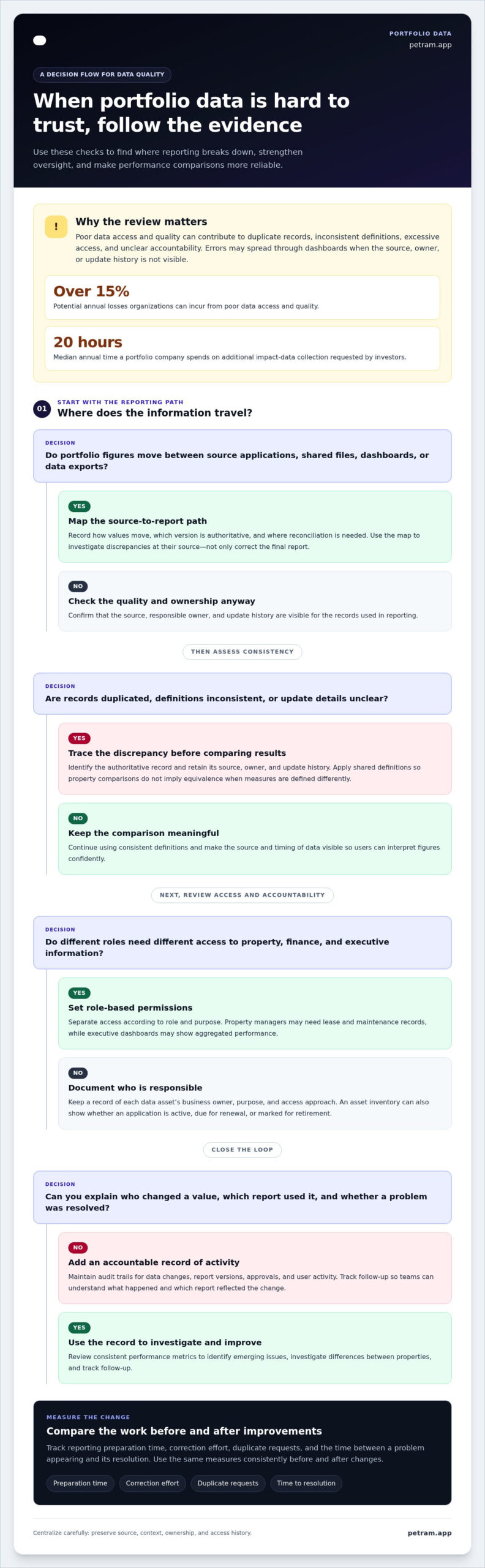
Poor data quality and weak governance can create duplicate records, inconsistent definitions, excessive access, and unclear accountability. When teams centralize information, errors can spread across dashboards unless source, owner, and update history remain visible. Organizations can incur over 15% in potential annual losses from poor data access and quality. The risk is not only a flawed report; it includes decisions made from incomplete or outdated operational information.
Manual collection also consumes portfolio company time. The median portfolio company spends 20 hours annually on additional impact data collection requested by investors. Repeated requests for the same figures can delay analysis and divert staff from operational work. To measure the return on improved data access, compare reporting preparation time, correction effort, duplicate requests, and the time between a problem appearing and its resolution. Track those measures consistently before and after changes.
Unified monitoring should cover every relevant access point, including source applications, shared files, dashboards, and data exports. A property manager might update an operating record in one system while finance exports figures to a separate spreadsheet. A source-to-report map helps identify how values move, which version is authoritative, and where reconciliation is needed. This visibility helps teams investigate discrepancies instead of simply correcting the final report.
Asset inventory supports governance because teams need to know which applications store or transmit portfolio data. Organizations using ISO/IEC 27001 as a security-management reference can connect each data asset with a business owner, purpose, and access approach. Record whether an application is active, due for renewal, or marked for retirement. That inventory makes access reviews more targeted and helps teams identify unused accounts or overlapping data stores.
Set controls according to each dataset’s sensitivity and purpose. Assign permissions by role, separating property operations, finance, and executive reporting where their needs differ. A property manager may need lease and maintenance records, while an executive dashboard may show aggregated performance. Maintain audit trails for data changes, report versions, approvals, and user activity. These records help explain who changed a value and which report used it.
Secure data sharing requires defined recipients and controlled access. Include single sign-on, multifactor authentication, encryption, and backups in your security review. For an investor report, grant access to the relevant portfolio view rather than a broad folder containing unrelated company records. Review permissions when responsibilities change and remove access that no longer supports a user’s role. This keeps reporting useful without making every record visible to every user.
Governance makes centralization an accountable operating model. Assign data owners, document definitions, and set review responsibilities for each source. When a discrepancy appears, an audit trail and named owner help trace the issue, correct the underlying record, and prevent repeat errors. Measure progress through fewer reconciliation steps, more timely reports, and fewer repeated data requests, not dashboard availability alone.
Unified portfolio visibility and data integrity
Unified visibility depends on connecting relevant property, accounting, and operational records while preserving their source context. Before relying on consolidated reporting, map, standardize, and validate the data.
Integrating Portfolio Data Sources
Data integration brings relevant portfolio records from separate applications, files, and operating systems into a consistent reporting structure. Start by mapping each source to the property, entity, and reporting field it supports. A lease record and a finance entry, for example, may describe the same tenancy differently. Matching identifiers and definitions helps teams compare results without losing sight of the original source.
Accounting and Operating-System Connections
Accounting platforms and property operating systems hold different parts of a portfolio’s records. Native connectors, APIs, file imports, and custom connections can bring them together while preserving source-system configurations. This can support consolidated reporting without replacing the accounting platform. A team can retain its existing ledger workflow while viewing property-level operating information alongside financial results.
Integrating Multiple Data Sources
Include every source that materially affects the portfolio view, such as accounting records, lease data, property operations, and approved reporting files. Define which system is authoritative for each field. For example, designate one source for lease status and another for posted financial transactions. Clear ownership reduces conflicting values and helps analysts trace figures to their origin.
Migrating Portfolio Data
Migrating portfolio data involves mapping source fields, standardizing definitions, transferring records, and validating the resulting reports. Begin with representative properties and entities, including unusual cases such as intercompany transactions. Record any excluded, transformed, or corrected fields. Documented mappings help finance and operations teams understand how legacy values appear in the consolidated environment and assess their reporting impact.
Validating Integrated Records
Validation compares migrated data with its source and tests whether totals and relationships remain consistent. Reconcile key balances, property identifiers, lease dates, and entity assignments before using dashboards for decisions. Test intercompany transactions and multi-entity reports, which can reveal mapping errors that simpler records may miss. Record discrepancies, assign an owner, and correct the underlying mapping rather than adjusting only the displayed result.
Maintaining Visibility During Change
Run old and new data systems in parallel for one or two reporting cycles to validate accuracy. Compare the same reporting period, investigate differences, and document which source explains each variance. Preserve access to source records during the transition so teams can trace values and support compliance reviews. Once reconciliations agree, users can rely on the consolidated view with clearer visibility into data lineage.
Centralized portfolio data and performance metrics
A shared data model makes performance easier to compare across properties and reporting periods. It also gives teams a defined source of truth for each metric.
Consistent Metrics and a Single Source of Truth
Consistent metrics use the same definitions, time periods, and calculation rules across properties. This lets portfolio teams compare results without relying on inconsistent spreadsheets or locally defined formulas. A data dictionary can define each measure, its unit, reporting period, source, and responsible owner. For example, it can specify which operating costs belong in a property-level expense metric.
Centralized data can bring investment details, performance metrics, and investor communications together in one repository. For commercial real estate, teams might align occupancy, lease status, rental income, and operating expenses with property and entity identifiers. The shared structure helps users trace a dashboard figure to its source record and understand how it was calculated.
Standard definitions also clarify differences between operational and investment measures. Return on investment (ROI), internal rate of return (IRR), and total value to paid-in capital (TVPI) can be brought together for private equity analysis, while property teams may focus on leasing and operating indicators. Document each metric’s calculation and scope rather than treating similarly named figures as interchangeable.
Spreadsheets can support review and analysis, but separate workbook formulas can create competing versions of a measure. A governed repository reduces ambiguity by identifying the approved calculation and recording changes. Finance and property operations, for example, can review the same expense definition and investigate variances without silently changing the underlying formula.
Types of Centralized Portfolio Data
Portfolio data includes the records needed to understand assets, performance, and investor reporting. Grouping these records by property, entity, and reporting period helps teams connect operational activity with financial outcomes. The relevant categories depend on the decisions portfolio managers need to make.
For a commercial property portfolio, a shared model may organize:
- Property and entity details, including identifiers and ownership relationships.
- Lease information, such as tenant records, lease status, and key dates.
- Financial data, including income, expenses, and cash-flow reporting.
- Operating measures, such as occupancy and property-level performance.
- Investor communications and portfolio performance measures.
Each category needs clear ownership and a reliable source. Teams can, for example, map lease status to its designated system and financial results to accounting records. This structure makes comparisons more useful: a manager can investigate a performance variance using related lease and operating context rather than interpreting a standalone figure.
Choose metrics that answer specific management questions, then apply their definitions consistently across properties. A documented data dictionary and shared identifiers turn separate records into comparable portfolio intelligence. This creates a more dependable basis for tracking performance, explaining differences, and deciding which issues warrant deeper analysis.
Portfolio management software and data tools
Portfolio management software connects operational records, financial information, and reporting workflows. The right tools make this practical by consolidating information while retaining useful analysis and review processes.
Benefits of Portfolio Management Software
Centralized software can give teams a consistent view across properties, support recurring reports, and reduce manual reconciliation. It can also help managers identify operational issues earlier and track their resolution. SaaS-based, cloud-native technology is designed to scale as organizations add clients and reporting needs grow, while Excel compatibility can preserve familiar analysis and approval workflows.
The benefits are strongest when a platform fits real portfolio processes. Evaluate it with representative data, intercompany transactions, and multi-entity reports. Check whether it can produce the outputs your team uses, such as balance sheets, profit and loss statements, and cash flow reports. These tests show whether consolidated reporting supports day-to-day decisions, not just attractive dashboards.
Centralization can also improve investor reporting. Teams can source information efficiently and tailor reports to individual or institutional investors. Standardized rules across portfolios can strengthen controls, while recorded changes, report versions, approvals, and user activity help users understand how a figure reached the final report.
Drawbacks of Centralized Management Tools
Centralized tools also introduce dependencies: inconsistent source data can flow into shared reports, integrations require ongoing attention, and users need clear access rules. A poorly configured system may reproduce existing spreadsheet problems at portfolio scale instead of resolving them. Data governance and validation therefore remain essential parts of the transformation.
Implementation also takes coordination across finance, property operations, and technology teams. For impact investors managing fewer than 10 companies with standardized metrics, optimizing spreadsheets may be suitable. Organizations handling more complex portfolios may benefit from a dedicated platform, but should pilot the framework with three to five portfolio companies before wider rollout.
Use a practical evaluation sequence:
- Map priority reporting tasks and identify the records each task depends on.
- Test representative property data, exceptions, and multi-entity outputs.
- Review access permissions, audit history, Excel workflows, and report controls.
- Compare the resulting reports with current processes and document discrepancies.
This assessment helps teams see where software can eliminate repeated work and where process changes are still needed. It also clarifies whether the platform supports portfolio growth without adding avoidable complexity. For commercial real estate teams assessing a dedicated solution, explore property management software as part of the evaluation.
Petram.app (Rezone): Property Manager Software (Rezone)
Petram.app (Rezone) offers Property Manager Software for commercial real estate portfolios. Its vertical SaaS is designed for the sector, with specialized digital tools to support property management workflows. For owners and managers looking to strengthen portfolio oversight, Rezone can help organize operations through software-driven workflows.
Rezone integrates AI Agents to help owners and managers streamline operations and increase property value. Consider how commercial real estate software can fit your workflows, reporting needs, and approach to portfolio information. Rezone provides digital tools designed for commercial property management rather than treating every asset class as the same.
Visit Petram.app to learn more about Rezone.
Make Better Portfolio Decisions with a Stronger Data Foundation
Centralizing portfolio data in one platform is not a finish line; it is an operating capability that develops as your portfolio, reporting needs, and management priorities change. Identify where fragmented information creates the most friction, then focus improvements on the decisions your teams need to make. Clear ownership, consistent definitions, and a measured approach to system changes help keep your data foundation useful over time.
For commercial real estate teams considering software built for their sector, Petram.app (Rezone) offers Property Manager Software (Rezone), a vertical SaaS for commercial real estate. It may be a relevant option when you’re evaluating tools to support property management workflows and portfolio operations.
Contact Petram.app (Rezone) to explore whether its software aligns with your commercial property management needs. A clearer data foundation can help your team move forward with greater focus and control.
Frequently Asked Questions
How Can You Overcome Centralized Reporting Challenges?
Start by locating where reporting breaks down: source capture, reconciliation, approval, or delivery. Assign an owner to each failure point, then define an exception workflow so missing or conflicting records reach the right person. For example, finance can classify a variance as a mapping issue or a late source update. Resolve the cause before changing reported totals, and use the same workflow across teams.
How Do Integrations and Reporting Workflows Compare?
Integrations move information between systems; reporting workflows govern what happens after data arrives. A connection may import a record, while a workflow routes it for review, approval, or correction. Compare options by asking how they handle failed transfers, duplicate entries, and corrections to previously submitted figures. A useful test follows one record from its source system through approval and into the final report.
How Do You Choose the Best Centralized Reporting Tool?
Choose a tool by matching its workflows to your team’s decisions, not by counting features alone. Define priority users, reporting outputs, source systems, and approval paths before evaluating platforms. Then test a realistic scenario, such as reviewing a property variance and documenting the decision. The right fit makes the process traceable and usable for both finance and property operations.
What Features Create Secure, Scalable Centralized Reporting Dashboards?
Look for dashboards that let users move from portfolio summaries to relevant property details without exposing unrelated records. Filters for entity, reporting period, and asset type help users compare like with like. Saved views can support recurring roles, while clear timestamps help readers judge how current the information is. For scale, assess whether administrators can maintain views and permissions as portfolios change.
What Security and Technical Requirements Should You Review?
Review how data moves, where it is stored, and how it can be recovered or removed. Ask technical teams to document supported connection methods, transfer failure handling, backup restoration procedures, and retention settings. Test access logs with a sample user change, such as removing a former employee’s permissions. For Polish operations, include personal-data flows in the organization’s GDPR review and record who owns each decision.
What are data silos, and why are they holding you back?
Data silos are records held in separate systems or team-owned files that do not connect reliably. They slow decisions because staff must reconcile different identifiers, dates, or versions before interpreting results. A portfolio review, for example, may show one property name in an operating file and another in a finance export. A shared identifier and documented mapping make those records easier to relate.
What integrations should a portfolio data platform support?
Prioritize connections to systems holding essential commercial property records: accounting, leasing, property operations, and investor reporting. The platform should accommodate the connection method each source supports, such as an API, native connector, or structured file import. Also assess how it handles changed fields and rejected records. A useful integration preserves source references so teams can trace a report value.
What security and access controls should a centralized portfolio platform provide?
Use role-based permissions so each user sees only the records and functions needed for their work. Separate viewing, editing, approving, and exporting rights where responsibilities differ. Establish an access lifecycle: grant permissions through an owner, review them when roles change, and remove them when they are no longer appropriate. Audit records should make access changes and report approvals traceable to individual users.