

To streamline accounts payable across a commercial property portfolio, centralize invoice records, assign each expense to the relevant property, standardize approvals, and reconcile payments with the general ledger. Property accounting software for commercial real estate can bring these workflows together while keeping income, expenses, and lease obligations organized for portfolio-level reporting.
When invoices, tenant receipts, and property costs sit in separate systems or spreadsheets, it becomes harder to see what is due, what has been paid, and how each asset is performing. You need more than a payment tool: the right setup should support clear financial records and fit the way your team manages its portfolio.
This article explains how to organize payables, track income and expenses by property, apply core accounting principles, and assess software features that matter in Poland. You’ll also learn how specialized property manager software can support commercial real estate workflows as your portfolio and reporting needs evolve.
Key Takeaways
- Standardize invoice coding, approvals, and payment tracking to make portfolio payables easier to monitor.
- Track income and expenses by property or agent to clarify asset performance and support useful reporting.
- Understand how accrual and cash-basis accounting differ, then align your records with your reporting needs.
- Assess software against your portfolio workflows, including lease administration, property-level reporting, and access to relevant summaries.
- For commercial property workflows, Rezone is a vertical SaaS property management option to consider.
How do you streamline accounts payable for a property portfolio?
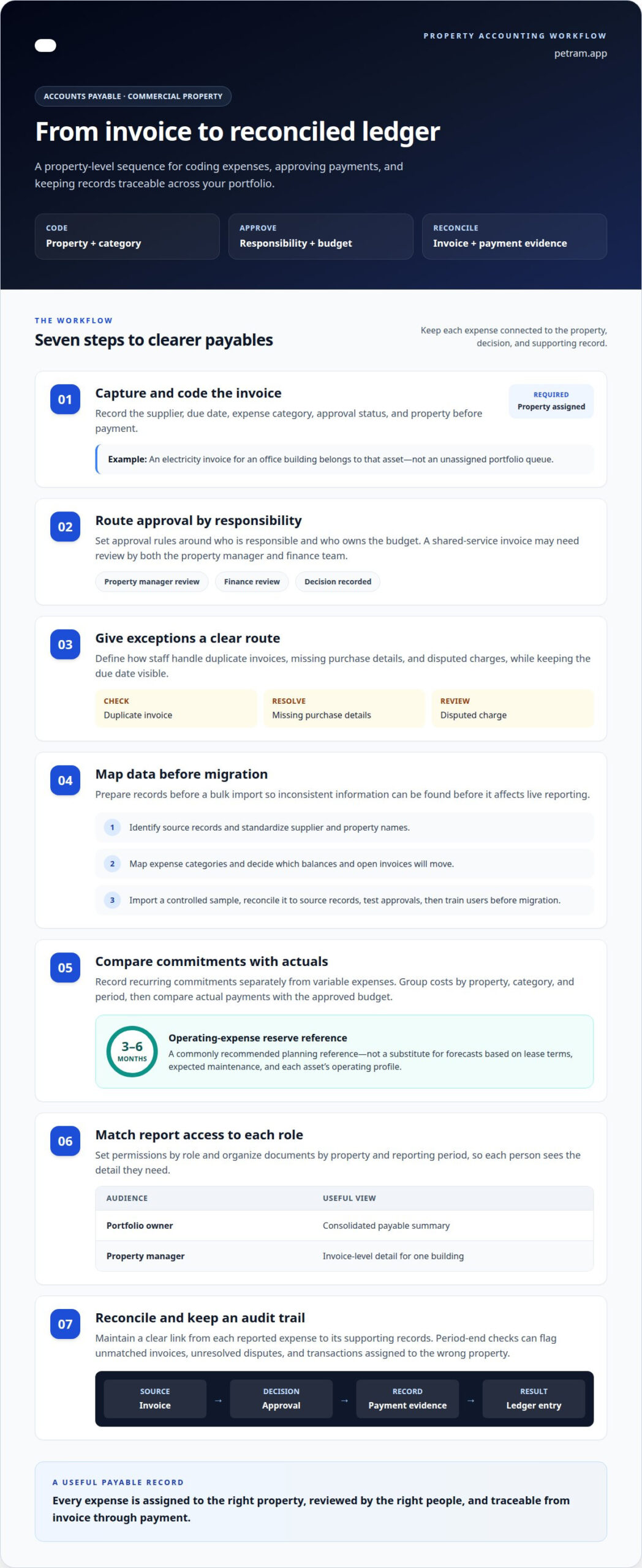
Streamline accounts payable by routing each invoice through a consistent property-level process. Capture the supplier, due date, expense category, approval status, and property before payment. For example, an electricity invoice for an office building should not sit in a general portfolio queue without an asset assignment. Clear coding gives finance teams visibility into obligations and helps managers distinguish property expenses from central operations.
Set approval rules around responsibility and budget ownership. An invoice for a shared service may need review by both the property manager and finance team. Record the decision and supporting document alongside the transaction, creating an audit trail that links the invoice, approval, and payment. A defined exception route also helps staff resolve duplicate invoices, missing purchase details, or disputed charges without losing sight of the due date.
Begin software implementation with data mapping, not a bulk import. Identify source records, standardize supplier and property names, map expense categories, and decide which balances and open invoices will move. Import a controlled sample, reconcile it against source records, test approval workflows, and train users before migration. This sequence can reveal inconsistent records before they affect live reporting.
Budgeting and forecasting improve when recurring commitments and variable expenses are recorded separately. Group expenses by property, category, and period, then compare actual payments with the approved budget. A commonly recommended reserve for real estate operating expenses is 3-6 months. Treat that as a planning reference, not a substitute for forecasts based on lease terms, expected maintenance, and each asset’s operating profile.
Customer portal access can give owners and other authorized stakeholders a focused view of reports and summaries. Set permissions by role, then organize documents by property and reporting period. A portfolio owner might need a consolidated payable summary, while a property manager needs invoice-level detail for one building. Consistent labels make these views easier to interpret and reduce requests for duplicate reports.
For audit preparation, maintain a clear link between each reported expense and its supporting record. A reviewer should be able to trace a ledger entry to the invoice, approval, and payment evidence. Period-end procedures can flag unmatched invoices, unresolved disputes, and transactions assigned to the wrong property. These checks support reliable financial reporting without turning every audit request into a manual search through email folders.
Custom analytics should answer operational questions, not simply display more figures. For example, a report can compare budgeted and actual utility expenses across buildings and highlight unusual movements for review. Real-time reporting helps when teams need current payable status, but dashboards work best with consistent coding and timely data entry. Agree on key measures, reporting periods, and access permissions before configuring views.
For multilingual reporting and communication, establish shared financial terminology across Polish and English materials. Keep property names, supplier records, expense categories, and document references consistent in both languages. A translated summary should retain the same period, category, and approval status as its source report. This helps international owners and local property teams discuss the same payable position without creating conflicting parallel records.
Tracking income and expenses by property or agent
Record each transaction against the property and, where useful, the responsible agent. This gives owners and tenants a clearer view of property performance.
Property-Level Income and Expense Tracking
Assign rent, service charges, insurance, utilities, and other transactions to the property that generated or incurred them. Add a responsible agent or management team as a separate reporting dimension to distinguish an asset’s results from the work of those overseeing it. For example, a portfolio report can show rental income alongside operating expenses for one building.
Use consistent categories and property identifiers across invoices, receipts, and reports. With consistent coding, you can compare income and expenses by property, agent, period, or category without manually sorting records. Review allocation rules when leases change or management responsibilities move, so transactions continue to appear under the correct asset and team.
Property Accounts and Construction Budgets
A property-specific chart of accounts groups transactions into meaningful categories while maintaining a consistent structure across the portfolio. For example, separate rental income, service-charge income, utilities, insurance, and capital improvements. This makes it easier to compare similar assets without merging distinct expense types or losing property-level detail.
For construction work, assign each invoice to the relevant property, project, and budget category. Track approved budgets, committed amounts, invoices received, and actual payments separately. A project report can then show variances between planned and recorded spending, helping the team identify which category needs review.
Construction costs need their own tracking logic because project spending can span suppliers, work stages, and financial periods. Link each cost to its project scope and approval rather than treating every invoice as a general building expense. This creates a useful history for reviewing completed work and comparing current commitments with the approved project budget.
Automated reporting can bring these dimensions together. A portfolio view might compare income and operating expenses across properties, while a project view isolates construction commitments for one asset. Filter by agent to clarify operational follow-up, then review exceptions such as uncategorized costs or income assigned to the wrong property. Automation supports accurate reporting only when transaction coding and source records remain consistent.
Use the resulting financial information to interpret investment performance, not just transaction volume. Compare like-for-like periods and categories, and distinguish recurring property operations from construction activity. If your team is aligning accounting records with day-to-day property management, explore property management workflows as part of the process.
General ledger, accounts payable and accounts receivable
A property accounting system connects the general ledger with payable and receivable records. Review how each transaction moves from source document to posting, reconciliation, and financial report.
General Ledger Management
The general ledger organizes transactions into accounts and provides the basis for statements such as the balance sheet. In a commercial portfolio, entries should retain useful dimensions, including property, entity, account, and reporting period. For example, a tenant payment and supplier invoice should post to distinct accounts while remaining attributable to the correct building.
Check that the posting process maintains a traceable link to its supporting record. A reviewer should be able to move from a ledger entry to the source transaction and see its description, date, and property allocation. Consistent account mapping also helps teams compare reporting periods without confusing operating expenses with rental revenue.
Receivables and Rent Collection
Accounts receivable tracks amounts owed to the property owner, including rent and other lease-related charges. Each charge should be linked to the tenant, property, relevant lease record, due date, and payment status. For example, a rent schedule can help a finance team distinguish an amount billed from a payment received and identify an outstanding balance.
Use a defined process to record receipts, allocate partial payments, and document unresolved differences. An overdue rent balance can signal a need for follow-up, while a property-level receivables report shows where attention is needed. Keep adjustments visible so a credit or correction does not silently change the record behind reported revenue.
Bank Feeds and Receipt Capture
Bank feeds can bring transaction details into an accounting workflow for matching against ledger entries. Review the matching rules for common cases, such as a tenant transfer with a recognizable reference or one payment covering several charges. Matching should not replace review: unclear amounts, duplicate entries, and unmatched transfers still need a documented decision.
Receipt capture lets staff associate supporting evidence with a transaction. For example, attach a scanned receipt to a card purchase, then record its property and expense category. Useful controls include checking the captured date and amount, flagging missing documentation, and retaining a clear path to the original file.
Choose the accounting basis according to your reporting purpose. Accrual accounting records revenue when earned and expenses when incurred; cash-basis accounting records them when cash is received or paid. Accrual accounting is required for GAAP compliance and suits commercial portfolios and institutional reporting. The distinction affects how a rent charge or supplier invoice appears across reporting periods.
Reconciliation connects these records. Compare bank transactions with cash entries, review unmatched items, and resolve differences before relying on period reports. For instance, a tenant’s combined transfer may cover rent and a separate charge. Allocate the receipt to the correct receivable accounts, then confirm that the bank balance and ledger reflect the same transaction.
For a practical software assessment, trace one rental charge and one supplier payment through the full workflow. Confirm that the general ledger, accounts payable, accounts receivable, bank reconciliation, and supporting documents remain connected. This end-to-end test shows whether processes produce accurate financial records for property teams and management decisions.
Real estate accounting software selection
In Poland, select software by matching its property workflows to your portfolio and reporting needs. Commercial real estate teams can assess specialist platforms alongside general accounting systems configured for property operations.
Portfolio and Implementation Fit
Map the work your teams perform before assessing a platform. Include property structures, lease variations, tenant records, transaction volumes, reporting roles, and the handoffs between property management and finance. Complexity often rises sharply around 20 units, when spreadsheets and general accounting software may no longer suit the workload.
Check how the system supports your organization’s structure. For example, a portfolio with several ownership entities may need distinct records alongside consolidated reporting. Review user roles, data access, and how the platform represents properties and entities. These choices determine whether staff can work with consistent information without mixing records.
Accounting Software Features
Assess whether the platform is designed for commercial property or adapted from general accounting software. Relevant capabilities may include property-specific reporting, lease administration, accounts payable and receivable, and service-charge reconciliation. Match each capability to an actual portfolio requirement rather than relying on a broad feature list.
Commercial real estate platforms and configurable accounting systems can both support operations in Poland. Their suitability depends on how well their functions align with commercial leases, property records, and your reporting structure. A system designed primarily for residential tenants may not reflect commercial lease arrangements or owner reporting needs.
Use a requirements matrix to compare systems consistently. For each function, note which team needs it, what information it uses, and what output it must produce. For example, an owner report may need consolidated figures, while a property-level view needs detail for asset oversight. This makes gaps and unnecessary complexity easier to identify.
Consider how the platform fits your existing finance environment. Review available data exports, integrations, access controls, and reporting formats against your actual processes. A finance team that closes accounts using a separate ledger may prioritize reliable information exchange, while an operations team may focus on convenient access to current property records.
Run a structured demonstration using representative commercial property scenarios. Include a lease with variable charges, a property expense, and an owner report. Ask team members responsible for each step to assess how well the system supports their work. Record unresolved requirements and compare them with your priorities before selecting a platform.
Choose the system that fits your commercial portfolio’s operating model and gives each team suitable access to relevant information. Reassess the fit when property structures, reporting expectations, or internal responsibilities change.
What features should commercial real estate property accounting software include?
Choose features that connect lease obligations, property transactions, and financial reports. For a commercial portfolio, value comes from how these functions work together in daily operations.
Start with lease management software that keeps key terms and payment obligations accessible to property teams. For example, an indexation clause can affect rent calculations, so staff need to connect relevant lease information with income records. Clear lease data supports consistent billing and helps explain changes in a property’s reported revenue.
Property-specific reporting helps owners understand performance by asset. Reports should let authorized users filter income and expenses by property, period, and account category. A portfolio summary can show consolidated results while preserving detail behind each building’s figures. This makes it easier to move from a high-level view to a transaction that needs review.
Look for accounts payable and receivable workflows that link charges, invoices, approvals, and payment status. Trust accounting can support separate fund tracking where required. The key is traceability: a rent receipt or supplier invoice should remain connected to its property, supporting records, and ledger entry.
For properties recovering shared operating expenses, CAM reconciliation tools can organize charge categories and support period-end comparisons. A useful workflow distinguishes expenses being allocated from amounts billed to tenants. It should retain underlying records so reported amounts can be traced to their source rather than recreated through manual calculations.
Reporting controls matter as much as dashboards. Review whether the system can produce a balance sheet and property-level reports using account structures that fit your financial reporting standards. Property accounting in Poland has no local standardization, so consistent internal definitions and reporting categories can help teams compare assets clearly.
Test the features with one complete example before selecting a system: enter a lease charge, record a tenant payment, post a property expense, and produce a report for that asset. Check whether each step retains the same property, account, and period details. This can reveal gaps between lease administration and accounting that a feature checklist alone may miss.
Prioritize functions that match your portfolio’s actual workflows, then assess how they support reliable records and decisions. Explore commercial property management software for a more connected approach to property operations.
Petram.app (Rezone): Property Manager Software (Rezone)
Petram.app (Rezone) provides property manager software designed specifically for commercial real estate. If your accounting review highlights a need to coordinate financial processes with wider property operations, Rezone can support commercial property management workflows.
Rezone is a vertical SaaS product for commercial real estate, built to support owners and managers of commercial portfolios. It focuses on property management and complements, rather than replaces, your accounting policies and financial reporting processes. Consider it when your team needs software focused on commercial property workflows alongside its accounting processes.
To discuss whether Rezone fits your property management needs, contact Petram.app (Rezone).
Set a clear direction for your next stage
Treat the platform decision as part of your operating model, not as a standalone technology choice. Identify who owns financial definitions, approval authority, reporting priorities, and data governance. This alignment gives your software decision a durable basis as buildings, tenants, and internal responsibilities change.
Choosing property accounting software for commercial real estate also gives you a chance to define what useful visibility means for your organization. Petram.app (Rezone)’s team brings experience in real estate and software development, supporting a practical perspective on property technology. Clear priorities help you decide whether a property management platform fits your operating model and how it should support your next stage.
If you’re considering a property management platform alongside your accounting processes, Contact Petram.app (Rezone). Move forward with a clear view of the workflows you want to improve.
Frequently Asked Questions
What are the benefits of effective property accounting?
Effective property accounting helps you understand each asset’s financial contribution and identify items that need attention. For example, comparing rent collected with outstanding tenant balances can help a manager prioritize follow-up. Clear records also help owners distinguish recurring income from one-off activity, such as a refurbishment invoice. Consistent property-level information supports operational decisions, portfolio comparisons, and discussions with stakeholders using the same financial picture.
What financial reports should property managers produce?
Property managers commonly need property-level income and expense statements, a balance sheet, cash flow information, rent and receivables schedules, and budget-versus-actual reports. The right reporting set depends on the owner’s decisions and the portfolio’s structure. For example, an asset manager reviewing operating performance may need expense categories by property, while an owner assessing liquidity may focus on cash position and outstanding receivables.
What is property accounting and how does it differ from general accounting?
Property accounting organizes financial activity around real estate assets, leases, tenants, and operating costs. General accounting records an entity’s finances but may not inherently connect transactions to individual buildings or lease obligations. For example, a commercial property team may need to distinguish rent, tenant charges, and property expenses by asset. Accrual accounting records revenue when earned and expenses when incurred; cash-basis accounting records them when cash moves.
What is real estate accounting software?
Real estate accounting software is a digital system for recording and reporting financial activity associated with property ownership or management. It can organize transactions by asset and support workflows such as rent administration, expense classification, and property reporting. When evaluating a system, consider whether it fits your portfolio’s lease structures and stakeholder reporting needs. Property accounting software for commercial real estate should reflect commercial property workflows, not just general bookkeeping.
What technology do you need for multi-property accounting in 2026?
For multi-property accounting in 2026, choose technology that keeps asset records distinct while supporting consolidated portfolio views. Useful capabilities include property-level transaction coding, role-based access, report filtering, document links, and data export for finance workflows. Your accounting basis and reporting requirements should guide configuration. If a platform also supports property management operations, assess how its records relate to your accounting processes rather than treating one tool as the entire financial control environment.
How do popular commercial real estate accounting platforms compare?
Compare platforms by workflow fit rather than popularity alone. A general accounting system may suit basic ledger needs, while a property-focused platform can organize lease and asset information alongside property operations. Assess how each handles commercial leases, tenant charges, portfolio reporting, approvals, and data migration. A useful comparison follows a representative rent charge and expense through entry, review, reporting, and reconciliation, then identifies any remaining manual steps.
How does software manage rent, service charges, leases, and tenant billing?
Software can connect lease details with billing schedules, tenant accounts, and payment records. For example, a lease record may inform a rent charge, while a separate service-charge entry records its billing category. Teams can then review amounts issued, receipts, and outstanding balances by tenant or property. Software organizes the workflow, while your team remains responsible for clear accounting rules for classifying charges and resolving adjustments.