

Yes, you can often keep your existing accounting system. Integrating accounting software with a property management platform can connect property operations to your ledger without replacing it. The right setup depends on your workflows and how reliably both systems exchange data.
Preserving familiar accounting processes while reducing duplicate data entry is a practical goal. Integrating accounting software with a property management platform can coordinate operational and financial records, support payment matching, and improve reporting visibility.
This guide compares integration approaches, explains how data moves between systems, and outlines what to assess before implementation. You’ll learn how automation can support invoices, payments, and rent updates, helping you choose a setup that fits your portfolio.
Key Takeaways
- You can often keep your existing accounting system by connecting it to a property platform that fits your workflows.
- Define which system owns lease and operational data and which manages the accounting ledger to reduce duplication.
- Map data fields and test the connection before migration so transactions transfer accurately.
- Choose automation around your priorities, such as invoice handling, payment matching, rent updates, or reporting.
- Compare integration approaches by compatibility, data flow, reconciliation needs, and the reporting your team relies on.
Bank reconciliations and financial reporting
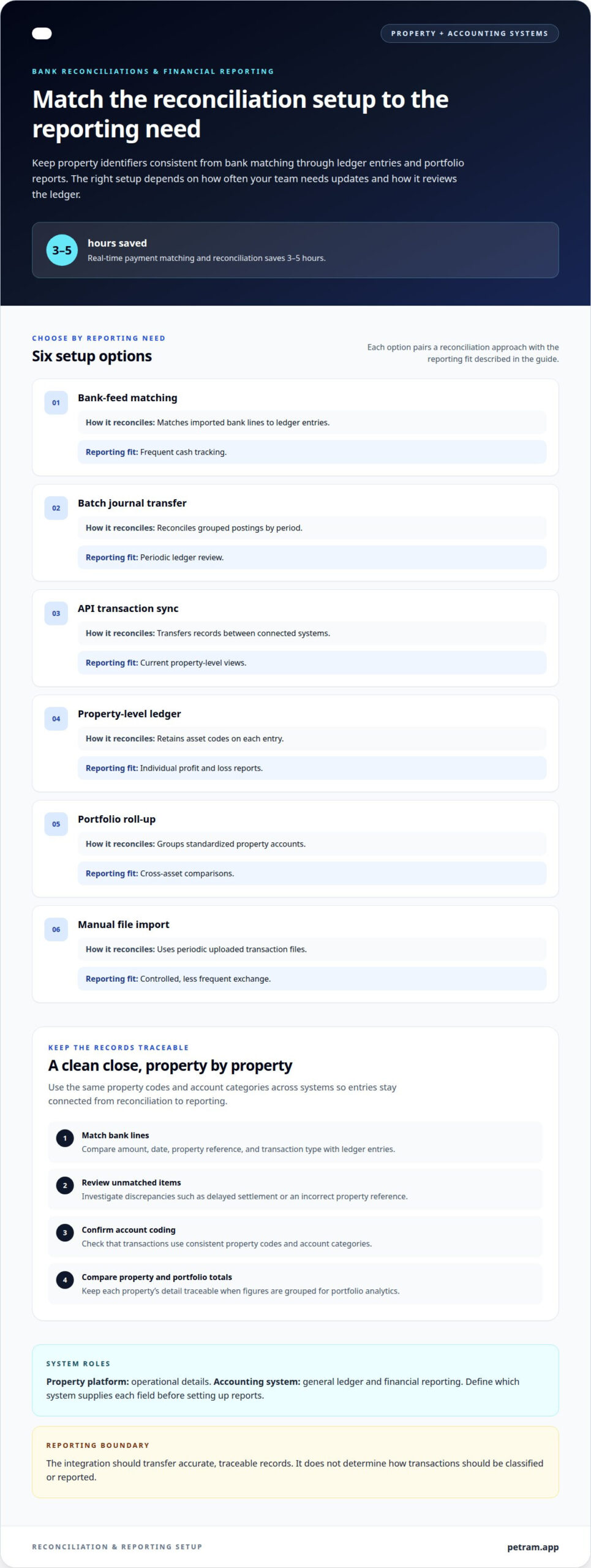
Start each reconciliation by matching bank transactions with ledger entries. Compare the amount, date, property reference, and transaction type. For example, a tenant’s rent payment should link to the correct property and accounting category. This helps identify duplicate postings, timing differences, and payments assigned to the wrong asset.
Define which system supplies each field before setting up reports. The property platform can hold operational details, while the accounting system maintains the general ledger and supports financial reporting. Use shared property codes and account categories in both systems. If a property has different codes across platforms, its transactions may appear on separate lines in a report.
Property-level profit and loss reports can group rental income and operating expenses by asset. Use consistent categories to roll those figures into portfolio analytics while retaining each property’s detail. For example, compare operating expenses across buildings using the same reporting period and account labels. Teams can then trace a portfolio-level variance back to the property records behind it.
For commercial property financial reporting in Poland, distinguish operational reports from accounting outputs prepared for the business’s applicable reporting requirements. Configure the accounting system and reporting process to reflect the entity’s needs. The integration should transfer accurate, traceable records, not determine how to classify or report them.
Where the systems allow it, keep supporting transaction records linked to their entries. For a rent payment, retain the tenant and property references; for an expense, retain its property and account category. These links help finance staff investigate discrepancies without relying on a separate spreadsheet. A documented exception process also clarifies who reviews unmatched entries and how corrections are recorded.
| Setup option | Reconciliation approach | Reporting fit |
|---|---|---|
| Bank-feed matching | Matches imported bank lines to ledger entries | Frequent cash tracking |
| Batch journal transfer | Reconciles grouped postings by period | Periodic ledger review |
| API transaction sync | Transfers records between connected systems | Current property-level views |
| Property-level ledger | Retains asset codes on each entry | Individual profit and loss reports |
| Portfolio roll-up | Groups standardized property accounts | Cross-asset comparisons |
| Manual file import | Uses periodic uploaded transaction files | Controlled, less frequent exchange |
Choose a setup that preserves property identifiers from bank matching through portfolio reporting. A team that needs current property-level views may favor transaction syncing, while a controlled, periodic close may suit batch transfers. Either way, document who resolves exceptions and how corrected entries reach the general ledger.
Use a close checklist for each property: match bank lines, review unmatched items, confirm account coding, and compare property totals with the portfolio report. Track recurring discrepancies by cause, such as delayed settlement or an incorrect property reference. This makes changes in reporting easier to investigate and explain across periods.
Data flows between operational platforms and accounting ledgers
Before connecting operations to the general ledger, define which system creates each record. A clear ownership map helps keep tenant, lease, and financial data aligned.
Real-Time Tenant, Lease, and Financial Visibility
Real-time visibility means a lease or payment update can appear across connected systems without waiting for a manual file transfer. For example, a recorded tenant payment can update the operational record and send its accounting data to the ledger. Compared with periodic batch transfers, this gives teams a more current view of real estate operations, but it depends on accurate identifiers and a functioning data connection.
Set the flow by record type: lease changes originate in the operational platform, while accounting entries post to the ledger. Authorize API data exchange, then test that a sample lease and payment appear in the correct records. Real-time payment matching and reconciliation saves 3-5 hours.
Manual Data Entry and Errors
Connected systems reduce repeated typing by transferring agreed fields between operational records and accounting entries. Without that handoff, staff may enter a tenant payment twice or mistype a property reference, creating errors and reconciliation work. Automation shifts the focus: instead of re-entering transactions, staff review exceptions such as an unmatched payment or incorrect account code.
Start with a defined transaction flow. For a rent receipt, transfer the tenant reference, property identifier, amount, and posting date. Confirm that the receiving system records each field once. Keep an exception queue for records that fail validation, so a missing tenant reference does not disappear in a batch import.
Data Migration and Field Mapping
Migration moves existing records into the connected workflow; field mapping tells each system where those records belong. Map equivalent fields before transfer, such as property code to property code and lease identifier to lease identifier. Unlike live syncing, which handles new activity after connection, migration addresses historical records, including duplicates and outdated entries that can distort opening balances.
Prepare a clean source file by removing duplicate and obsolete records. Then map corresponding fields and test data integrity with representative records. Compare transferred totals and key identifiers with the source. If one system stores a lease start date differently, test that field separately before moving the full dataset.
After migration, authorize the connection and test data flows between both systems. Check that a changed lease record reaches its mapped destination and that an accounting entry retains its property reference. Accurate field mapping helps resolve discrepancies between connected systems. Document who reviews failed transfers and how corrections are entered, keeping operational and ledger records traceable.
For a commercial real estate portfolio, the practical choice is not simply live or batch transfer. Match the method to the record: frequent payment activity may need timely syncing, while historical records require careful migration and validation. A written data map, tested API exchange, and exception process give your team clear control over each handoff.
Automation of invoices, payments, and rent updates
An integration can transfer invoice data, but correct Polish VAT treatment and JPK reporting depend on accounting configuration. It can also match rental payments, deposits, expenses, and owner statements when records share identifiers, transaction types, and posting references.
Automation works best when each event has a defined source and destination. A lease update can trigger an invoice change; a recorded payment can update tenant status and accounting records. This creates a consistent workflow without replacing the accounting system or its established review controls.
Rent Payment Synchronization
Rent payment synchronization transfers payment records between property operations and accounting. Unlike invoice automation, which creates or updates amounts due, synchronization records amounts received and their status. Each transaction should retain its property, tenant, lease, date, and reference so finance staff can identify partial payments or unmatched receipts.
For a 50-property portfolio, automatically syncing invoices from property management software to accounting saves 5-10 hours per week. Automatic invoice updates triggered by lease rate changes save 2-4 hours per rent review cycle. These workflows help teams track scheduled charges and actual receipts separately.
Automatic Payment and Owner Statement Reconciliation
Automatic reconciliation compares transaction records across systems using shared references and amounts. Rental receipts, refundable deposits, and property expenses should retain distinct transaction types so a deposit is not treated like rent. Owner statements can then draw on matched income and expense entries, while unmatched items remain visible for review.
For example, a payment may match a tenant invoice, while a maintenance expense matches its property record. A deposit should link to its tenant and lease reference. Clear matching rules distinguish these events and reduce manual investigation. Automation supports reconciliation, but staff still need a process for reviewing exceptions and correcting source records.
Payment reminders and debt notifications depend on accurate invoice status. Set the workflow to compare due dates with recorded payments, then flag overdue or partially paid invoices. A reminder should reference the relevant tenant and invoice, while the accounting record reflects any later payment. This prevents a notification from staying active after the debt has been settled.
For invoice automation, define which lease fields affect charges, including rate changes and effective dates. Test a rent update against the resulting invoice before applying the process across the portfolio. Confirm that the accounting entry carries the same property and tenant references. This helps distinguish a valid rent change from a duplicate or incorrectly coded invoice.
Polish VAT and JPK reporting require configured accounting records, not simply a data connection. Map invoice details to the relevant accounting-system fields and preserve transaction documentation for review. Treat JPK output as an accounting-system reporting task, and ensure transferred records contain the data required by the configured process.
An enterprise workflow should measure more than the number of automated steps. Track failed transfers, unmatched payments, corrected invoices, and outstanding notifications. These exception patterns show whether automation is working or merely moving errors faster. Define who resolves each exception and how corrected records return to connected systems.
Integration with existing accounting platforms
Keep your accounting system if the property platform can exchange the records your ledger needs. Native integrations, third-party connectors, and custom API integrations differ in setup, data handling, and flexibility.
Commercial property platforms commonly integrate with Xero, QuickBooks Online, Sage Intacct, and NetSuite. For Polish operations, assess these accounting systems against your workflows and required data fields. The property platform also needs to support a compatible connection.
Native Integrations
A native integration is a connection built into the property or accounting platform. It generally offers a direct way to transfer supported records, such as invoices or payment entries. It may require less configuration than other options, but available data flows depend on the systems’ built-in capabilities.
Before relying on a native integration, identify which records move and in which direction. For example, confirm whether a rent charge transfers as an invoice or only as a ledger entry. This distinction affects how a landlord reviews tenant balances and makes financial decisions.
Third-Party Connectors
A third-party connector sits between systems, transferring data according to configured rules. Unlike a built-in integration, it can bridge platforms without a direct native connection. Its suitability depends on supported applications, mapped fields, and how it handles failed or repeated transfers.
For example, a connector might pass invoice details from a property platform to QuickBooks Online. Define which system owns each record and how the connector flags errors. A transfer log helps staff trace whether a missing payment failed at the source, in the connector, or at the accounting destination.
Custom API Integrations
A custom API integration connects systems through an application programming interface, with data flows designed around specific operational needs. Unlike a standard connector, it can support tailored field mapping and workflows. It also requires deliberate design, testing, and ongoing technical oversight.
Use this approach when standard options do not carry the fields or transaction logic your portfolio requires. Specify the records, transfer direction, and error handling first. Then authorize data exchange and test sample transactions before live processing. A payment test should preserve tenant, property, and ledger references.
Compare options by compatibility, record coverage, transfer direction, and exception visibility. A native connection can suit a straightforward workflow; a connector can bridge compatible systems; a custom API can address distinct data requirements. The deciding factor is whether the approach preserves the records your accounting team needs without introducing duplicate entries.
Commercial property management software commonly integrates with Xero, QuickBooks Online, Sage Intacct, and NetSuite, but compatibility depends on the specific connection. For Polish accounting workflows, document the required invoice and ledger fields, test sample records, and confirm that transaction data reaches the intended accounting process. This gives you a practical basis for selecting an integration without replacing a functioning accounting system.
Benefits of integrating property and accounting software
The value depends on whether connected data improves daily decisions, financial reporting, and portfolio oversight. Measure the outcome against your current processes, not automation alone.
Integrated teams typically reduce administrative overhead by 40-60%. Consolidated reporting from synchronized data saves 4-8 hours/month. These figures describe reported market outcomes, not a guaranteed result for every Polish portfolio. The practical benefit comes from reducing repeat work and giving finance teams more time to review exceptions.
Start with a defined purpose. For example, connect rent records and expenses so an asset manager can review property-level results alongside portfolio performance. Consistent property identifiers help teams trace a reported variance to its source. Without that link, a consolidated figure can be harder to explain or act on.
Before selecting a solution, ask which records flow between systems, how often they sync, and how errors appear. Find out how the solution preserves property-level detail, handles failed transfers, and supports your financial reporting workflow.
For a Poland-based integration, include GDPR in the design review. Map personal data, document its purpose, and define access, retention, and transfer controls with your data-protection lead.
Use specific operational measures to judge the result:
- Compare manual invoice handling before and after automation.
- Track unmatched payments and how quickly teams resolve them.
- Review whether property expenses retain their asset and account references.
- Measure the time needed to prepare consolidated portfolio reports.
These measures connect technical performance to business outcomes. For example, fewer unmatched payments can reduce reconciliation work, while consistent expense coding can make property comparisons clearer. Track results across reporting periods, since one successful transfer does not show that every workflow operates as intended.
Keep the solution proportionate to your operations. A portfolio with standardized records may benefit from a simpler data flow; complex ownership structures or reporting needs may require more tailored mapping. Either way, document who reviews exceptions and how corrected records reach the ledger. This process protects decision quality as data changes.
Choose the integration that improves the reporting and workflows your team actually uses. Explore connected commercial property workflows as a next step.
Petram.app (Rezone): Property manager software (Rezone)
Petram.app (Rezone) provides Property manager software for commercial real estate operations. Rezone is a vertical SaaS product designed for teams managing commercial properties and portfolios. It can be a natural next step when you want to organize property workflows in software built for the commercial real estate sector.
For an accounting connection, define the operational records your team needs to manage and the financial data your accounting system requires. Use those needs to assess platform fit, data flows, and reporting workflows. Rezone supports property management operations; your integration design should make clear how relevant information moves between property and accounting records.
If you’re considering property manager software for your commercial portfolio, contact Petram.app (Rezone) to discuss your needs.
Turn your integration plan into a practical next step
Your next step is to turn integration goals into a decision record: which workflows should change, who owns each dataset, and what evidence will show the connection is working. This gives operations and finance teams a shared basis for assessing options before implementation.
Use that record to keep the scope practical. Separate essential requirements from later enhancements, and identify decisions that need input from finance, operations, and technical teams. The goal of integrating accounting software with a property management platform is not simply to connect systems, but to establish an operating model your team can maintain as portfolio needs change.
Petram.app’s team brings a commercial real estate perspective to property software, with Rezone focused on this sector. If you’d like to discuss how the platform could fit your property management processes, Contact Petram.app (Rezone). A considered next step can help your team move forward with greater clarity and control.
Frequently Asked Questions
Can you keep your existing accounting system?
Yes, you can often retain your accounting system if the property platform can exchange the records your accounting workflow needs. For example, your finance team can keep its established chart of accounts while property records provide tenant and lease references. Confirm which system remains authoritative for each record, and test whether corrections in one system affect the other. This helps avoid duplicate records and conflicting versions.
What is the difference between one-way and two-way integration?
A one-way integration transfers data in a single direction, such as property transactions into an accounting ledger. A two-way integration lets data pass between both systems, so changes can flow back as well. For example, a posted accounting status might update a property record. Decide which records need each direction, then define which system controls edits to prevent conflicting updates.
How does integration help you grow and scale?
Integration can help a growing portfolio manage more properties without increasing repetitive data entry at the same pace. For example, standardized property codes let finance teams consolidate records while retaining asset-level detail. As your portfolio expands, shared workflows also make it easier to onboard properties consistently. Growth still depends on clear ownership, repeatable processes, and reporting that reflects how your organization makes decisions.
How long does the integration process take?
Integration typically takes a few days to a couple of weeks, depending on system complexity and the amount of data transferred. A connection using clean, consistently structured records may need less migration work than one with duplicate entries or custom field mappings. Testing also affects the schedule. Plan time to validate representative records and resolve transfer errors before relying on the connection for routine reporting.
How much time and money does integration save?
Time savings depend on the workflows automated, transaction volume, and the manual work replaced. To assess the result, record how long staff spend processing invoices, matching payments, and preparing reports before implementation. Compare those activities after the system is in use. The financial effect depends on how your organization values recovered staff time and applies it to other operational or portfolio priorities.
What if I encounter problems during integration?
Start by identifying where the transaction failed: the source platform, the connection, or the accounting system. Review error logs and compare the affected record with its original data. Correct the source or mapping issue, then test the transfer again. For complex technical problems, an IT team can investigate the integration, while software support teams can help diagnose platform-related issues.
What data can be synchronized between property management and accounting software?
Depending on the connection, synchronized data can include tenant charges, invoices, payments, deposits, property expenses, and owner distributions. Lease identifiers and property codes help tie each transaction to the right asset and account. For example, a rent receipt should retain its tenant and lease references. Define the fields each workflow needs rather than transferring unrelated records by default.
What are the costs of accounting software integrations for property managers in Poland?
There is no single integration figure that applies to every Polish property-management setup. The work involved depends on the systems already in use, the connection method, data quality, field mapping, and testing requirements. A native connection may involve a different scope from a third-party connector or custom API. Compare options by required workflows, ongoing oversight, and the records they transfer.