

Certificate of insurance tracking for commercial real estate links each certificate to the tenant, vendor, property, and contract requirements it must meet. A clear process records coverage dates and status, flags missing or expiring documents, and routes certificates for review. A certificate summarizes policy details, but it does not replace the policy or any required endorsement.
Organizing records is only part of the task. Property and construction teams also need a reliable way to compare certificate details with lease or vendor requirements, assign follow-up, and keep unresolved issues visible.
This guide explains how to structure certificate records, manage review and renewal workflows, and compare coverage information with contract terms in Poland’s commercial property sector. It also clarifies where administrative tracking ends and authorized insurance review begins, so your process supports compliance without treating a certificate as proof of every policy condition.
Key Takeaways
- Build a record for each certificate that captures its status, expiry, reviewer, and next action.
- Set renewal reminders around contract terms and review capacity, then keep follow-ups visible until resolved.
- Store the official certificate alongside its related tenant, vendor, property, and agreement records for easier access.
- Compare certificate details with the relevant contract checklist, while keeping coverage decisions with an authorized reviewer.
- Monitor open and aging items across the portfolio so missing documents and upcoming expirations receive timely attention.
What is certificate of insurance tracking for commercial property?
Certificate of insurance tracking for commercial real estate links each certificate to a tenant, vendor, property, and contract. It records key dates and review actions so teams can identify documents that are expiring, missing, or incomplete.
What a Certificate Tracking Record Contains
An insurer or broker issues a certificate of insurance to verify that a policy exists and summarize selected policy details. For a commercial property, the certificate may show coverage types, coverage amounts, stakeholders, and the policy’s expiration date. It is a summary, not the policy itself.
A useful tracking record preserves the official certificate and adds operational context. Link it to the relevant tenant or vendor, covered location, agreement, and reviewer. Record the effective and expiration dates, policy reference, current status, and next action. For example, linking a construction vendor’s certificate to its site and contract makes it easier to assess than storing it under an unclear file name.
Make open work visible in each record. Note when a renewal request is due, who owns the follow-up, and whether review is outstanding. This gives property, risk, and legal teams a consistent view without treating the tracking entry as a substitute for the certificate.
Automated Certificate Workflows
An automated workflow can flag an approaching expiration, prepare a renewal request, and track whether an updated certificate arrives. Software costs depend on the case and are provided after a quote request; portfolio size, user access, workflow scope, and integrations shape the cost.
Automated verification can compare visible certificate fields with a checklist, such as required coverage categories and dates, and flag missing information for human review. Before choosing a management solution, assess whether it supports renewal status, assigned reviewers, follow-up steps, and non-compliance notifications. Automation organizes the review; an authorized person still decides whether coverage meets contractual requirements.
Expired and Noncompliant Certificate Risks
An expired certificate no longer provides current documentation for the period shown. A missing or incomplete certificate can leave a property team unable to document whether a tenant or vendor has met the insurance terms in its agreement.
Consequences depend on the contract and circumstances. A tenant may be out of compliance with lease requirements, and the agreement may provide remedies for that breach. If an incident occurs, unclear or inadequate documentation can complicate the response and expose gaps in operational records. A certificate tracker should flag the issue, not claim that a policy has been cancelled or make a coverage decision.
Responding to Missing or Inadequate Certificates
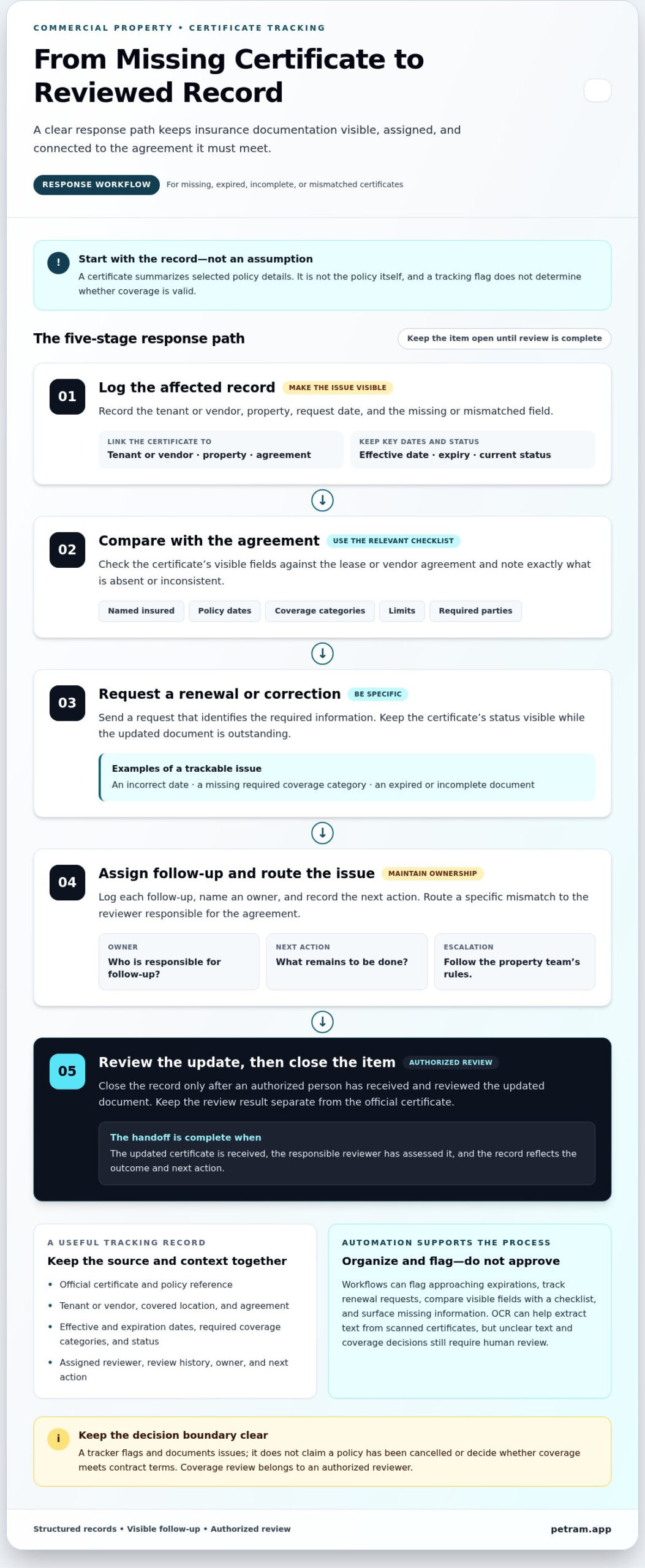
Start by recording the affected tenant or vendor, property, request date, and missing or mismatched field. Compare the certificate with the relevant agreement, then send a renewal or correction request that identifies the required information. Keep the status visible while the document is outstanding.
Log each follow-up and assign an owner and next action. If a certificate lists an incorrect date or omits a required coverage category, route that specific issue to the reviewer responsible for the agreement. Escalate unresolved records according to the property team’s established rules. Close the item only after an authorized person has received and reviewed the updated document.
Centralized storage for insurance and vendor documents
Central storage connects each insurance document to the tenant, vendor, property, and review history it supports. Structured records help property, risk management, and legal teams find current files and identify unresolved work.
Organized COI Records
Use a consistent record for every certificate, whether it comes from a tenant, contractor, or subcontractor. Store the official document with the covered location, policy reference, effective and expiration dates, required coverage categories, current status, and assigned reviewer. These fields make property-specific searches more useful than folders organized only by vendor name.
Keep related items together without replacing the certificate with a summary. For example, a tenant record can connect its certificate to the relevant lease and renewal correspondence. A vendor record can link its certificate to the property or project where work takes place. Use clear file names and access permissions so authorized teams can find records while keeping sensitive information controlled.
A review queue makes handoffs traceable. Record who received the document, who reviews it, the review date, any issue or decision, and the next action. If a certificate is awaiting legal or risk review, keep its status visible rather than letting it disappear into an inbox. Notifications can alert the assigned reviewer when a file arrives or an item remains open.
Insurance Document Verification
Verification starts by comparing the certificate’s visible fields with a checklist provided by the client. A reviewer can inspect the named insured, policy dates, coverage categories, limits, and required parties, then record missing or inconsistent details. Keep the review result separate from the source document so the official wording remains available for reference.
OCR-supported review can extract text from a scanned certificate and populate fields for comparison. For example, it may identify a policy number or expiration date, helping the reviewer find those details faster. Treat extracted text as a review aid, not an approval: scans can contain unclear text, and an authorized reviewer must resolve discrepancies against the original file.
For a clear handoff, attach the reviewer’s comment to the record and assign a next action, such as requesting a corrected certificate. This helps property, risk, and legal teams follow the same status without relying on separate email threads. Notifications should identify the open issue and its owner, not merely announce that a document exists.
Teams refining these records alongside broader portfolio processes can explore commercial real estate management software as a next step.
Commercial real estate and construction insurance compliance
Compliance connects insurance documentation to lease, service, and construction obligations. In Poland, start with the requirements in the relevant agreement, then track each document against those terms.
There is no single certificate checklist that fits every commercial property contract. A lease may specify tenant coverage and required stakeholders, while a construction agreement may set requirements for the contractor and subcontractors. A certificate summarizes policy details; it does not replace the policy or an endorsement. Use the agreement and checklist as the reference for review.
Property Management Compliance
Property managers can organize compliance by linking each tenant’s certificate to its lease and covered location. Compare the document’s visible coverage types, amounts, policy dates, and named parties with the lease checklist. Record each item as current, incomplete, or awaiting review, and assign an owner to resolve discrepancies.
This process gives teams a consistent view of status across properties. For example, if a certificate names the wrong property manager, record the mismatch and route it for correction instead of marking the certificate compliant.
Construction work adds another layer. A general contractor’s certificate may not represent the insurance records of every subcontractor working on a site. Create separate records for subcontractors, link each to the relevant project, and compare its certificate with the applicable contract requirements. This helps property teams identify whose documentation needs attention.
Optical character recognition (OCR) can extract visible text from scanned certificates, including policy dates, named insureds, and coverage limits. Use extracted fields to support checklist comparisons and flag information for review. OCR can streamline document handling, but it may misread scans or similar names. Keep the original certificate accessible, and have a reviewer resolve unclear or mismatched fields before recording a decision.
Third-Party and Vendor Verification
Third-party verification should link each vendor’s certificate to its work, location, and agreement. Compare the named insured, coverage categories, limits, dates, and required stakeholders with the relevant checklist. Store the reviewer’s finding and next action with the record so an incomplete certificate does not appear approved.
For vendors and subcontractors, maintain a visible status such as received, under review, correction requested, or reviewed. Route exceptions to the person authorized to assess them. A tracking workflow can organize documents and notifications, but it should not approve coverage exceptions without authorization.
For a practical compliance process, define the checklist from each agreement, preserve the source certificate, and document every review handoff. This creates a clear audit trail across tenants, vendors, and construction projects without confusing administrative verification with an insurance coverage decision.
Matching coverage limits to contract requirements
A certificate review should compare policy details with the specific lease or vendor agreement. A shared checklist helps an organization identify mismatches while keeping software out of the decision-making role.
Policyholder and Coverage Details
Start with the policyholder’s name and confirm it matches the tenant or vendor named in the agreement. Then compare the certificate’s coverage types, policy limits, and expiration dates with the contract requirements. Depending on the agreement, the certificate may show general liability, property insurance, or specialized coverage.
Review the Description of Operations field for relevant project or location details. Check whether required stakeholders are listed as additional insured entities. A certificate summarizes coverage, but it is not itself an endorsement. If the agreement requires additional insured status, review the corresponding endorsement as supporting documentation.
Separate field matching from coverage interpretation. A platform can flag a visible difference, such as an expired date or a listed limit below the contract requirement. The assigned reviewer can then assess the discrepancy against the agreement and record a decision or follow-up. This keeps automated comparisons useful without allowing a software rule to approve an exception.
For example, a vendor certificate may list the correct policyholder and coverage category but show a different limit from the one required by its service agreement. Record the exact field, relevant contract clause, reviewer, and next action. This gives the organization a traceable reason to mark the certificate incomplete or route it for further review.
Coverage Requirement Matrices
A coverage requirement matrix turns contract language into reviewable fields. Create a row for each tenant, vendor, or project, then map each required coverage type to its applicable limit, required parties, and policy period. Keep the source agreement linked to the row so reviewers can trace each criterion to its contractual basis.
Use distinct statuses for fields that match, need attention, or require an authorized decision. Do not turn a blank or unclear contract requirement into an invented threshold. Instead, route it for interpretation and document the outcome before using it as a comparison rule.
Keep responsibility for the matrix clear when contract terms change. When an agreement is amended, update the relevant requirement and retain the previous review history. Then compare the current certificate against the revised terms, including policy dates and required limits. This prevents a software platform from applying an outdated checklist to a new contract period.
Reviewers should also record why a document passes or remains open. A concise note such as “limit matches agreement; endorsement pending review” identifies both the checked criterion and outstanding action. Consistent fields across a portfolio make exceptions easier to sort and direct to the right reviewer.
Commercial real estate insurance tracking
A commercial landlord tracks tenant certificates by linking each document to the tenant, lease, property, and policy dates. The workflow records requests, reviews, renewal follow-ups, current status, and who is responsible for the next action.
This structure makes insurance compliance part of routine portfolio management rather than a separate inbox task. The goal is a current view of open work across every location.
Start with a request log for each tenant. Record the property or department requesting the certificate, tenant contact, request date, required certificate language or coverage categories, follow-up dates, current status, and next owner. Keep the official certificate attached to its record. The tracking entry organizes work but does not replace the document.
Next, connect each record to the lease requirements. Compare the visible certificate details with the relevant terms, including coverage categories, limits, required stakeholders, and policy dates. Clearly mark missing information and assign a reviewer. If the tenant has not sent a certificate, log the request and each follow-up, then route the unresolved item according to the property team’s escalation rules.
Timing matters. Set reminder dates based on the agreement, operating risk, and the team’s review capacity. Review upcoming expirations and aging open records regularly, with weekly visibility focused on unresolved work rather than the number of stored files. That view helps teams prioritize a certificate awaiting correction over one already reviewed.
Manual certificate tracking can take property managers 15-20 hours per week. Automated tracking can monitor expiration dates and policy requirements across a portfolio, send advance notifications, and support renewal follow-up. Automated tracking is promoted as a way to save more than 15 hours weekly. The practical value comes from routing each alert to an owner and recording what happens next.
To streamline risk management, divide the workflow into clear stages: request, receipt, administrative review, correction or escalation, and closure. For example, a tenant’s certificate may arrive before renewal but remain open because a required field needs review. Keep its status visible until the reviewer records the decision and next action.
Property teams can also send certificate copies electronically to their insurance agent or insurance company for filing. Keep the document, related lease record, and review history together. This creates a useful record for property, legal, and risk management teams without confusing document coordination with coverage judgment.
Put portfolio-wide tracking into a more structured property management workflow. Explore commercial property management software for organizing operations across commercial real estate assets.
Petram.app (Rezone): Property Manager Software (Rezone)
Petram.app (Rezone) offers Property Manager Software designed for commercial real estate operations. Its vertical SaaS platform uses AI Agents to help owners and managers streamline workflows across commercial property portfolios.
Consider Rezone when insurance records are part of broader property management processes and your team needs a more structured digital operating environment. It supports the wider work of managing commercial properties, while certificate requirements, coverage comparisons, and approval decisions remain tied to your agreements and authorized review process.
Explore how Rezone fits your commercial property management workflows at petram.app.
Make insurance visibility part of portfolio operations
Treat insurance visibility as part of the operating model, not as a periodic document exercise. As portfolios evolve, ownership changes, leases renew, and projects move between teams. A reliable process remains clear through these transitions, with responsibility for maintaining records and resolving exceptions clearly assigned.
This discipline also supports better management decisions. When leaders can see where documentation work stands across properties and teams, they can identify process bottlenecks, refine handoffs, and allocate review capacity before open items become routine disruptions. The goal of certificate of insurance tracking for commercial real estate is not simply to store files, but to make insurance administration visible within property operations.
Start by identifying where document ownership currently breaks down, then map those friction points to the systems your teams use to manage the portfolio. Petram.app (Rezone) offers Property Manager Software (Rezone), a vertical SaaS for commercial real estate. If you’re evaluating how digital property management can support your operating model, contact Petram.app (Rezone). A more connected approach can help your teams move forward with greater clarity.
Frequently Asked Questions
How should a commercial property COI review handoff be written?
Write each handoff as a concise decision record identifying the document, issue, reviewer, and next action. For example: “Tenant certificate received; policy dates match the lease; named property manager requires confirmation; assigned to the lease reviewer; status remains open.” Include the review date and the source file location. This gives the next person enough context to continue without interpreting an incomplete email thread.
Which commercial property COI records should a team maintain?
Maintain a record for each tenant, vendor, and relevant subcontractor, linked to the property or project they serve. Include the source certificate, related agreement, policy reference, coverage dates, review status, assigned owner, comments, and request or follow-up history. Keep prior documents and decisions accessible when a renewal replaces an earlier certificate. This history explains why a record changed and supports continuity when responsibilities move between team members.
What is certificate of insurance tracking for commercial real estate?
A certificate of insurance tracking system for commercial real estate organizes certificates and their administrative follow-up across properties, tenants, and vendors. It helps teams see which documents are received, awaiting review, approaching expiration, or awaiting correction. The tracker provides workflow visibility, not a substitute for the certificate, policy, contract, endorsement, or authorized insurance review. Its value depends on linking records to the agreements and locations they relate to.
What information must a certificate of insurance include for a commercial property?
The required details depend on the relevant lease or vendor agreement, so no single checklist applies to every commercial property. Teams commonly review the policyholder, insurer, policy reference, coverage type, limits, effective and expiration dates, and required stakeholders. The Description of Operations may also help identify covered work or locations. Use the contract wording as the review standard, and route unclear terms for authorized interpretation.
How often should certificates of insurance be collected and renewed?
Collect a certificate when the applicable lease or vendor arrangement requires evidence of coverage, and request an updated document before the current policy period ends. Set reminders using the agreement’s terms, the property’s operating risk, and the team’s review capacity. Revisit the schedule when a lease, vendor relationship, project scope, or policy changes. A fixed calendar alone can miss a change that creates a new documentation requirement.
What software platforms track certificates of insurance for real estate portfolios?
Choose a platform that can associate documents with properties and counterparties, preserve source files, show review status, and assign follow-up ownership. Property management software can support broader portfolio workflows, while certificate-specific processes still need a defined checklist and authorized reviewer. Petram.app (Rezone) offers Property Manager Software for commercial real estate operations. Assess how your team will manage certificate records within its operating process, without assuming software makes coverage decisions.