

What if a building’s most valuable technology isn’t the sensor itself, but the better decision its data makes possible? For commercial property owners and managers, smart building technology for commercial properties can include anything from automated HVAC controls to connected systems that reveal operational patterns. That range makes it important to distinguish useful capability from added complexity.
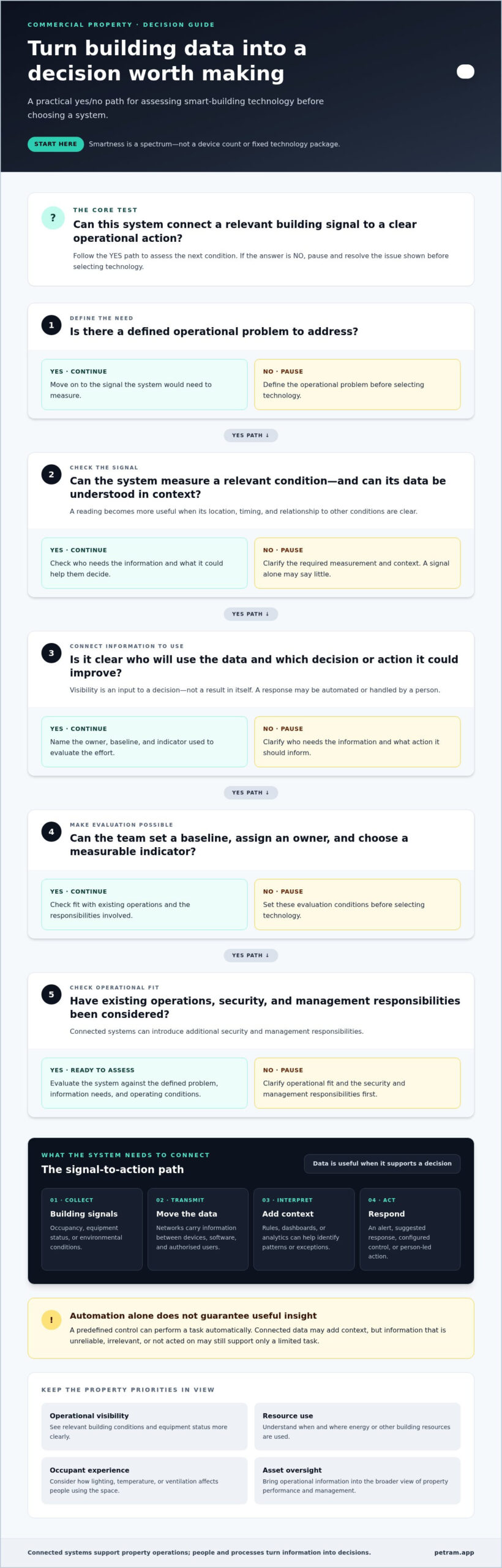
To assess a system, ask what it measures, who will use its data, and which decisions the information could improve. Also consider how it will fit existing operations and what security and management responsibilities it creates.
This guide explains the main components of a smart building system, how they work together, and where they may support decisions about energy, occupancy, and property operations. It also covers how to plan adoption with interoperability, cybersecurity, and operational fit in view. Building systems generate data; property-management software such as Rezone can support the workflows that help commercial real estate owners and managers use operational information more coherently.
Key Takeaways
- Smart buildings are a spectrum of connected capabilities, not a single device or fixed technology package.
- Trace how building signals become useful decisions: data is collected, transmitted, interpreted, and acted on.
- Assess smart building technology for commercial properties by matching potential benefits with the conditions and metrics needed to evaluate them.
- Start with a defined operational problem, then set a baseline, assign an owner, and choose a measurable indicator before selecting technology.
- Separate systems that monitor or manage physical building operations from property-management software that supports commercial real estate workflows.
What smart building technology means for commercial properties
Connected building systems collect data and use it to support informed or automated operational responses. That is the core idea behind smart building technology for commercial properties, but it doesn’t describe one device, product, or fixed package. A building may have automated heating controls but provide little visibility beyond those controls. Another may connect several systems and present their information in context, helping a property team decide what action to take.
A smart building uses connected systems to collect and interpret information about building conditions, then supports decisions or actions that help manage the property. The response may happen automatically, such as adjusting lighting according to a schedule, or come from a person reviewing relevant information. For a wider overview of the concept and its components, see What is a Smart Building?
Think of smartness as a spectrum. At one end, individual systems perform defined tasks independently. At the other, information from multiple systems can be considered together, giving teams a broader view of conditions and operations. The value depends less on the number of connected devices than on whether their information is relevant, understandable, and linked to a clear operational decision.
For commercial property teams, that distinction connects technology to four recurring priorities:
- Operational visibility: See relevant building conditions and equipment status more clearly.
- Resource use: Understand when and where energy or other building resources are being used.
- Occupant experience: Consider how conditions such as lighting, temperature, or ventilation affect people using the space.
- Asset oversight: Bring operational information into the broader view of property performance and management.
Visibility is an input to a decision, not a result in itself. Teams still need to interpret what the information means and decide what response makes sense.
How a smart building differs from a building with automation
Automation executes predefined control actions. A heating system might follow a programmed schedule, for example, without considering whether a space is occupied. Smart-building capability can add connected data and analysis: occupancy information could help inform lighting or ventilation schedules, depending on the system’s design and the team’s operating rules.
That added context matters, but automation alone doesn’t guarantee useful insight, better service, or improved performance. If data isn’t reliable, relevant, or acted on, a connected system may simply carry out the same limited task more automatically.
Why commercial property teams are paying attention
Owners, occupiers, and operating teams have overlapping but distinct needs. An office team may focus on space use and comfort; retail operations may care about conditions across customer-facing areas; an industrial property may prioritise equipment status and process requirements. Mixed-use assets must account for several types of use within one property.
Shared visibility can help teams discuss conditions using a clearer operational picture. The decision framework should still reflect the asset: identify who needs the information, what action it could inform, and how the team will judge whether that action was useful.
How smart building technology connects systems, data, and decisions
A smart-building setup is best understood as a flow, not a catalogue of devices. It moves from a signal inside the property to information that can support an operational response. Sensors generate signals, while context makes those signals actionable. A temperature reading alone says little. Its location, timing, relationship to other conditions, and relevance to an operating objective help determine what it means.
- Collect signals. Internet of Things (IoT) devices and connected equipment can report occupancy, equipment status, or environmental conditions such as temperature.
- Transmit data. Wired or wireless networks carry information between devices, software, and authorised users. The route and format depend on the systems in place.
- Interpret context. Rules, dashboards, or analytics can help distinguish routine readings from patterns or exceptions that may need attention.
- Take action. A system may issue an alert, suggest a response, or trigger a configured control. A person or process must handle the insight when action isn’t automated.
The building technology stack: sensors, networks, and controls
Sensors and connected equipment are data sources, not complete smart-building solutions. Networks transport their information, while software can organise or analyse it. A building management system (BMS) may coordinate selected services and controls, such as HVAC, lighting, access, or energy systems, within the scope it has been configured to manage.
These elements don’t connect or communicate by default. Systems can differ in age, interfaces, data formats, and operating rules, so the technology stack varies by property. As JLL discusses in its Strategies for Smart Building Implementation, effective planning involves more than selecting connected equipment. For operators, the practical questions are which information needs to move between systems, in what format, and who is authorised to use it.
From building data to useful operational insight
Analytics can help identify recurring patterns or exceptions when the underlying data is reliable and properly contextualised. For example, a change in equipment status could be assessed alongside operating schedules and other relevant readings. That may prompt an alert or recommendation for review; it doesn’t, by itself, diagnose a fault or complete a follow-up task.
Keep capabilities distinct. An alert flags a condition, a recommendation proposes a possible response, and an automated action changes a control according to defined rules. Each requires suitable data and clear operating boundaries. A named person or team should own review and follow-through, with a process for recording what was decided.
This is also where building-level control differs from portfolio oversight. A BMS focuses on selected physical services in a building. Property-management software supports broader commercial real estate workflows, where teams coordinate information and responsibilities across assets. Rezone is designed for commercial real estate management; property-management workflow software can complement building technology without implying that every sensor or control is directly connected to it. Define how a building-level insight enters a workflow, who reviews it, and how its status is tracked.
Smart building benefits and trade-offs: what commercial owners should assess
Connected technology can make building conditions easier to assess, but device count isn’t a measure of property performance. More sensors may produce more information without improving decisions, especially if readings are unreliable, systems remain disconnected, or no one is responsible for acting on findings. To get operational value from smart building technology for commercial properties, define what you want to improve and how you’ll assess progress.
Smart-building value depends on usable data, defined ownership, and measurable objectives. The potential benefits below are conditional: each depends on the property, the quality of its information, and the operating process around it.
| Potential value | Required conditions | Measure to monitor |
|---|---|---|
| Energy-use visibility can help teams review patterns and identify areas for operational attention. | Relevant, consistent usage data; context such as operating schedules; an owner for reviewing exceptions. | Energy use over a defined period, compared with an appropriate baseline. |
| Equipment-status information may provide earlier awareness of unusual conditions. | Reliable status data, clear alert thresholds, and a defined review and escalation process. | Time from an alert to review, decision, and recorded follow-up. |
| Occupancy and environmental information can inform space planning and occupant-experience decisions. | Data that reflects the intended spaces and periods, with appropriate access and interpretation. | Space-use patterns or relevant comfort indicators tracked consistently. |
Where connected building technology can add operational value
Energy data is most useful when teams relate usage to how a property operates, rather than treating a reading as a conclusion. Equipment monitoring may help surface changes that merit attention, but it doesn’t guarantee predictive maintenance or identify a cause. Occupancy and environmental data can inform decisions about space and conditions, provided teams interpret it alongside the property’s needs and use.
What can limit results: integration, security, and data governance
Inconsistent readings can distort comparisons, while disconnected systems can leave teams with incomplete views or duplicate work. Interoperability affects whether information can be interpreted across systems. Establish what data is available, how it is described, and who can access it. Don’t assume every system shares information seamlessly.
Cybersecurity and access governance require continuing attention as connected devices, users, and data flows change. Define access by role, establish responsibility for reviewing permissions, and include system changes in operational oversight. Data governance should also clarify what is collected, why it is needed, who owns its review, and how long it should be retained under the organisation’s policies.
Finally, assign operational accountability. A person or team should review alerts, decide whether a response is warranted, approve changes to controls, and document follow-up. Without that ownership, an alert can remain unread and a recommendation can go untested. Set a baseline before adoption, then review the chosen measure at planned intervals. If data quality or the operating process is inadequate, address those constraints before expanding the deployment.
How to plan a smart building technology programme
A practical programme starts with an operational problem, not a sensor, platform, or automation feature. For smart building technology for commercial properties to support better decisions, the use case should fit the asset and its operating model. A visibility gap in an office may call for a different approach than one in an industrial or mixed-use property. Start with a scope small enough to learn from, then use evidence to decide what comes next.
A practical sequence for prioritising the first use case
Use this sequence to test whether a proposed project addresses a real need and can be assessed. Keep the initial scope bounded: one operational issue, a responsible owner, and a clear way to review progress.
- Identify recurring friction. Pinpoint a repeated delay, blind spot, or manual task affecting the property team. Describe the operational impact rather than naming a preferred technology.
- Check the evidence. Establish whether relevant data exists, is accessible, and is dependable enough to inform a decision. Review existing systems, connectivity, user roles, and how the team currently handles the issue.
- Define responsibility and a baseline. Name who will review the information, what action they can take, and how the current process will be measured. Select an indicator suited to the use case, such as response time or data completeness.
- Review before expanding. Assess what the trial revealed, including data gaps, workflow friction, and limitations. Use that learning to decide whether to refine the use case, extend it, or stop before adding systems or properties.
How to measure progress without overstating results
Choose a measure that reflects the operational question. If the goal is clearer visibility, track whether the needed data is available and complete. If the aim is a more coordinated response, record the time between an issue being identified and its review. Document the baseline and review period before comparing results.
Interpret changes in context. Occupancy, opening hours, weather, and other operating conditions can affect readings, so record relevant changes alongside the indicator. A difference observed after deployment doesn’t, by itself, prove that the technology caused it. Separate what the data shows from what the team can reasonably attribute to the programme.
Planning should also account for the management layer. Building systems observe or control physical conditions; property-management software supports the workflows through which commercial real estate teams organise responsibilities and operational information. A commercial property management software strategic guide can help frame how that layer fits into broader asset operations. Define the process and information flow rather than assuming a direct connection between platforms.
For a broader view of how management software fits into commercial property workflows, see Rezone property-management software.
How property-management software fits into a smart building strategy
Smart building technology for commercial properties can produce information about physical conditions, but building data alone doesn’t coordinate every task involved in managing an asset. Building systems observe or control equipment and environments. Property-management software supports the workflows that organise responsibilities, information, and follow-up across commercial real estate operations. These layers can complement each other, but they have different roles.
The difference between building systems and property-management workflows
A building system might report equipment status or control a selected service. A property-management workflow helps determine who reviews that information, what action is appropriate, and how the decision is recorded or communicated. Owners can map the path from operational signal to management action by identifying the responsible role, decision point, and follow-up process.
For example, a building-level alert may indicate a condition that requires review. A defined management process can establish who assesses the alert, how a decision is documented, and how relevant stakeholders are updated. The value lies in making responsibilities clear, not in assuming that every alert automatically becomes a task in a management platform. Coordination depends on deliberate processes and appropriate data flows.
Before introducing software into this operating model, separate what the building system produces from what the property team needs to manage. Some information may be useful for an immediate operational response; other information may support broader oversight or recurring workflows. Define which details matter, who should see them, and what decision they are meant to support. This keeps technology aligned with actual work rather than creating another disconnected information source.
Where Rezone belongs in the wider technology landscape
Rezone is vertical SaaS built specifically for commercial real estate property management. It combines property-management tools with AI agents intended to help owners and managers streamline operations and support property value through digital workflow optimisation. It belongs in the management-software layer, not as building hardware or a physical maintenance service.
That distinction helps set realistic expectations. Rezone supports commercial property workflows; it isn’t a sensor network, building management system, or automatic connection to physical controls. A technology plan can still consider how building-generated information fits into management processes, while defining the route and responsibility for that information rather than presuming a direct integration.
For owners and managers, the wider opportunity is a more coherent operating model: building systems provide relevant signals, people interpret them, and property workflows help coordinate the resulting decisions. Keep data access and responsibility clear, and ensure each layer serves a defined purpose. The right arrangement depends on the property’s systems and management needs, not on a universal software template.
See how Rezone supports commercial property management workflows.
Turn a Clear Priority Into Your Next Step
The next move doesn’t need to be a large-scale transformation. Choose one property-management priority, define the decision or workflow you want to improve, and establish how your team will assess progress. That gives you a practical foundation for deciding where smart building technology for commercial properties fits within a wider operating strategy.
Building systems and management software serve different roles, but both contribute to a more coordinated approach when responsibilities and processes are clear. Rezone is vertical SaaS built for commercial real estate, with property-management tools and AI agents intended to help owners and managers streamline operations. Its focus on digital workflow optimisation supports commercial property asset management without replacing the building systems that observe or control physical conditions.
Bring your operational priorities into sharper focus with Explore Rezone.
Frequently Asked Questions
Is smart building technology the same as a building management system?
No. A building management system (BMS) can be one component of a broader smart-building environment, coordinating selected services such as heating or lighting. The wider setup may also involve connected devices, data networks, analytics, and defined operating procedures. Before relying on a BMS report in a portfolio review, clarify which system produced it, what the reading represents, and who is responsible for interpreting it.
Can smart building technology work without 5G?
Yes. Smart building technology for commercial properties can use different connectivity options, and 5G isn’t a universal requirement. The best fit depends on the use case: a device sending occasional status updates has different communication needs from a system requiring frequent data exchange. Map the devices, coverage conditions, security requirements, and response expectations first, then assess which network approach supports those needs.
Is smart building technology suitable for older commercial properties?
Yes, existing commercial properties can be considered, but their infrastructure shapes what is practical. Begin by documenting equipment, available connections, data access, and the operational issue you want to address. For example, a team might first assess whether a specific system can provide usable status information before considering wider deployment. Don’t assume legacy equipment will connect directly; compatibility and implementation needs depend on the actual site.
Can tenants control smart building systems directly?
Sometimes, depending on building policy, system design, and access permissions. A property team might provide occupants with limited controls for a shared space while reserving other settings for authorised staff. Before rollout, define which users can view information, request a change, or operate equipment, and identify who approves exceptions. Clear boundaries help prevent confusion between occupant preferences and the property’s operational and security requirements.
What happens to building data when a property changes software vendors?
Data transfer isn’t automatic in every system. The outcome depends on contracts, architecture, export capabilities, and retention arrangements. Before a transition, document which party controls each data set, who can access it, what export formats are available, and which records must remain accessible. Assign responsibility for transferring and validating relevant information, and plan how teams will continue their workflows during the changeover.
How should a property team respond to inaccurate smart-building sensor data?
Don’t treat an unusual reading as a verified building condition. First, compare it with the device’s reporting time, recent readings, and other relevant information, then record whether the signal was confirmed or corrected. If the discrepancy could affect an operational decision, follow the team’s established review process before acting on it. Repeated inaccuracies are a reason to reassess the data source and its suitability for the use case.